




Automatic waitlist: open spots fill themselves
When a session is fully booked, your clients join the waitlist. If someone cancels, the next person moves up automatically and is notified right away, by email and push notification.
- Free plan, free forever
- No demo call, start right away
- No credit card
Updated 25 September 2026
Waitlist at a glance
- moves up after every cancellation
- Automatic
- first to join is first to move up
- In order
- payment deadline for held spots
- 2 to 48 hrs.
- are held when joining
- Credits
- Bookicorn checks for open spots
- Every 5 minutes
- uses an add-on slot, even on the Free plan
- Add-on
What is an automatic waitlist?
An automatic waitlist collects clients for fully booked sessions and hands out spots that open up without you lifting a finger: when someone cancels, the next person in line moves up and gets an email and a push notification. With online payment, Bookicorn holds the spot for them until a deadline. With credits or for free offerings, they are booked for good right away.
- Who it's for
- For anyone with scheduled sessions that regularly sell out: yoga and Pilates classes, fitness classes, workshops or popular evening sessions.
- What you get
- Automatic moving up, a payment deadline or instant booking, held credits, emails and push notifications, an overview in the Manager and moving people up by hand.
- What it costs
- The waitlist is an add-on and uses an add-on slot in your plan, which works even on the Free plan. You pay 0% commission on your bookings.
How to get Waitlist
You turn on Waitlist in the Add-on Store of your Manager with one tap and can switch it off at any time. It uses one of your plan's add-on slots. Once all slots are taken, you can add it on in the paid plans.
- Applies to offerings with scheduled sessions
- People move up until the session starts, never into canceled sessions
- Your team manages waitlists with the Manage waitlist permission
- With the Resources add-on, there is also a daily waitlist for reservations
- Free
- 1 slot
- Starter
- 3 slots
- Professional
- 8 slots
- Premium
- all add-ons
A cancellation the night before, and the spot stays empty?
- Sorry, I can't make it tomorrow after all!
- Do you have anything open? I already asked last week.
- Just saw a spot opened up. Is it still free?
Whoever cancels writes to you. Then you search through chats and notes for who else wanted in, message them and wait for a reply. Often the spot stays empty.
When someone cancels, the next person moves up automatically and gets notified. In the overview you always see who is still waiting.
How your clients move up
You set once how payment is handled. The waitlist takes care of the rest.
- 1
Client joins
When a session is full, Bookicorn offers Join the waitlist. Your client sees their position and gets a confirmation by email.
- 2
A spot opens up
When someone cancels, the first person moves up immediately. On top of that, Bookicorn checks every five minutes whether a spot has opened up in an upcoming session.
- 3
Pay or booked right away
With online payment, the person gets a payment link and the spot stays held until the deadline. With credits or for free offerings, they are booked for good right away.
What the waitlist can do
From a single open spot to a class you just expanded: Bookicorn fills whatever opens up.
All featuresMove up automatically
Every cancellation passes the spot on to the waitlist, whether your client or your team cancels. When you add spots in the Manager, as many people move up right away as there is room for.
Hold the spot until paid
With online payment, Bookicorn holds the spot for the person moving up. You choose a deadline of 2 to 48 hours, and it ends at the latest when the session starts. If the person doesn't pay, the next one is up.
Or book right away
Alternatively, the person moving up is booked for good right away and payment stays open. You collect it yourself, for example on site or by bank transfer.
Credits are held
If the offering costs credits, they are held when joining and charged when moving up. If your client leaves the list or the session takes place without them, they get the credits back automatically.
Notified by email and push
Clients get a confirmation with their position when they join, and an email and a push notification when they move up. You choose whether joins, departures and people moving up reach you by email.
Overview in the Manager
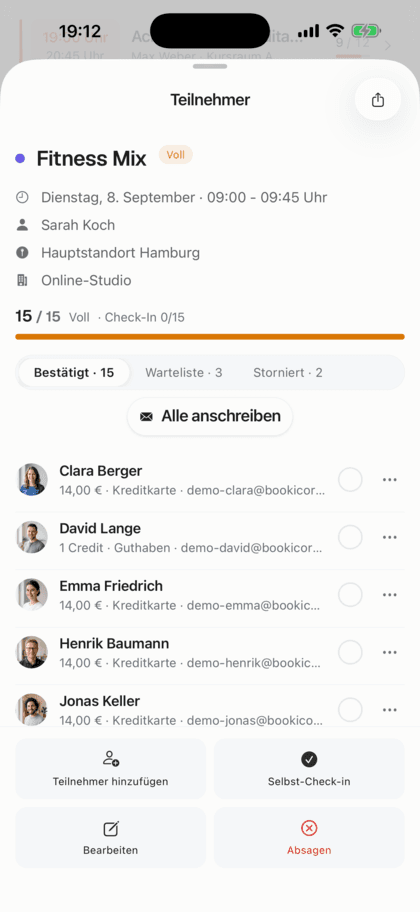
Everyone waiting for upcoming sessions with their position, held credits and status, plus key figures such as the average wait time.
Move people up by hand
You let a specific person move up, even ahead of the others. If the session is full, the confirmation shows you the bookings, and it is only overbooked if you confirm.
Also included
- Waitlist also visible right in the session
- Payment by card or PayPal via the link in the email
- Clients leave the waitlist themselves
- Remove people from the list, with an email to them
- Message people who are waiting directly
- Never moves up into canceled or started sessions
- Daily waitlist for reservations with the Resources add-on
Start for free, no demo call
Create your account and set everything up in a few minutes. The Free plan stays free forever, and for 14 days you can also try every feature.
- Start right away, no demo call
- No credit card needed
- Cancel monthly
 BookicornFree plan
How studios use the waitlist
Four typical setups, depending on how your clients pay.
Yoga studio
Evening classes are often full. Clients with a 10-class pass move up right away, their credits are already held.
- Payment
- Credits
- Moving up
- booked for good right away
Pilates studio
Reformer classes with online payment. A spot that opens up stays held for half a day.
- Mode
- hold until paid
- Payment deadline
- 12 hours
CrossFit box
Early morning classes, last-minute cancellations. The short deadline passes the spot on quickly.
- Mode
- hold until paid
- Payment deadline
- 2 hours
Cooking school
Popular cooking evenings, paid on the night itself. People moving up are in right away.
- Mode
- book right away
- Payment
- on site
What others use together with the waitlist
Core features are included in every plan, add-ons you turn on when you need them.
Booking rules and cancellation policy
Set the booking window, booking cutoff, cancellation deadline and payment methods for each offering. Bookicorn applies them to every booking.
Learn moreAvailable spots display
Your clients see how many spots are left for every session, on the booking page and in the client app. Sessions filling up or full are clearly marked.
Learn moreClass packs
Sell 10-class packs and other class packs online. Bookicorn deducts credits with every booking and shows your clients their balance.
Learn moreRebooking
Clients and your team move a booking to another session without canceling and booking again. The payment moves along, and the waitlist moves up.
Learn moreNotifications and reminders
Reminders before the session, push in the client app, notifications in the Manager and emails about new bookings. You decide who hears about what.
Learn moreOnline payments with Stripe
Your clients pay online when booking by card, Apple Pay, Google Pay, Klarna and more. The money goes directly to you through Stripe, with no commission.
Learn moreFrequently asked questions about the waitlist
Answered briefly. The first sentence is always the answer.
Can't find your question?
Write to usClients join the waitlist for a fully booked session and move up in order as soon as someone cancels. The person moving up gets an email and a push notification, and you don't have to do anything.
Still have questions about the waitlist?
Write to us in two minutes. You get a personal reply from people, not from a bot, and we tell you honestly whether Bookicorn is right for you.

Hi, I'm Daniel. Tell me briefly what you offer, and I'll tell you how to set it up in Bookicorn.
Daniel Haenle · replies personally

Ready to stop giving away open spots?
Create your account in a few minutes, turn on the waitlist and choose how people moving up pay. The Free plan stays free, and you don't need a credit card.
- 14 days of every feature
- No credit card
- 0% commission
- No minimum term

Ready to go in minutes
- Create your account
- Add your first offering
- 3Share your booking page