




Automatic reminders and push: clients and team stay in the loop
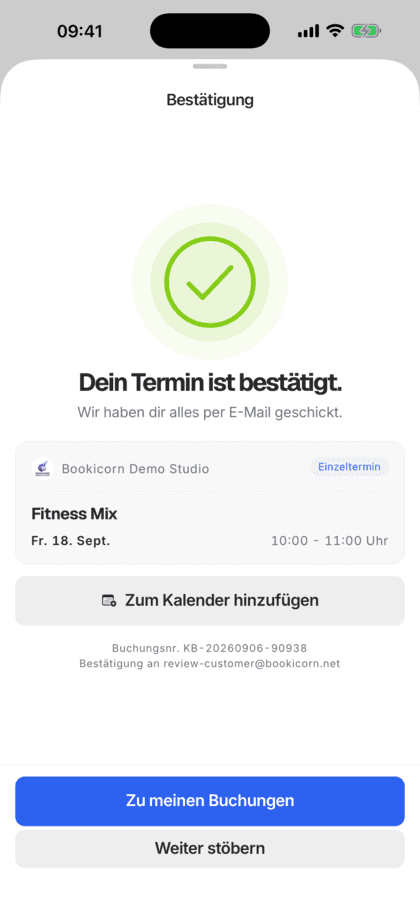
Your clients are reminded before the session and hear about confirmations, cancellations and open spots by notification. You see new bookings, cancellations and sign-ups in the Manager and by email.
- Free plan, free forever
- No demo call, start right away
- No credit card
Updated 25 September 2026
Notifications at a glance
- included even in the Free plan
- In every plan
- reminder before the session
- 1 to 72 hrs
- of notifications clients choose themselves
- 4 categories
- emails to your studio switchable individually
- Per event
- in the recipient's language
- 7 languages
- servers, GDPR-compliant
- Frankfurt
How do notifications and reminders work in Bookicorn?
Bookicorn notifies your clients automatically by email and as a notification in the client app: before the session, on confirmation, cancellation, a waitlist spot, check-in and new messages. Your studio sees new bookings, cancellations, sign-ups and reviews as notifications in the Manager and by email if you like. You decide which events trigger an email, even individually for each instructor.
- Who it's for
- For studios, schools and instructors whose clients shouldn't forget sessions and who want to see right away what's happening in the studio.
- What you get
- Session reminders by email and notification, push in the client app, notifications in the Manager with filters, emails per event and announcements to all clients.
- What it costs
- Notifications and reminders are included in every plan, even the Free plan for €0. Emails for individual instructors come with the Trainer Portal add-on.
Reminders by WhatsApp and bookings nobody sees?
- Oh no, that was today? I completely forgot.
- I booked last night, did you see it?
The evening before, you send reminders by hand, and whoever misses them doesn't show up. You only notice new bookings and cancellations when you check yourself.
Your clients are reminded automatically and get changes on their phone right away. You see everything that happens on the bell in the Manager and get the emails you actually want.
Set up in three steps
Most notifications work right away. You only decide on reminders and emails.
- 1
Turn on reminders
Under Settings, App you turn on session reminders and choose how many hours before they arrive, between 1 and 72.
- 2
Choose emails for the studio
Under Settings, Notifications you decide which events send you an email, and add a second address if you like.
- 3
Everything on the bell
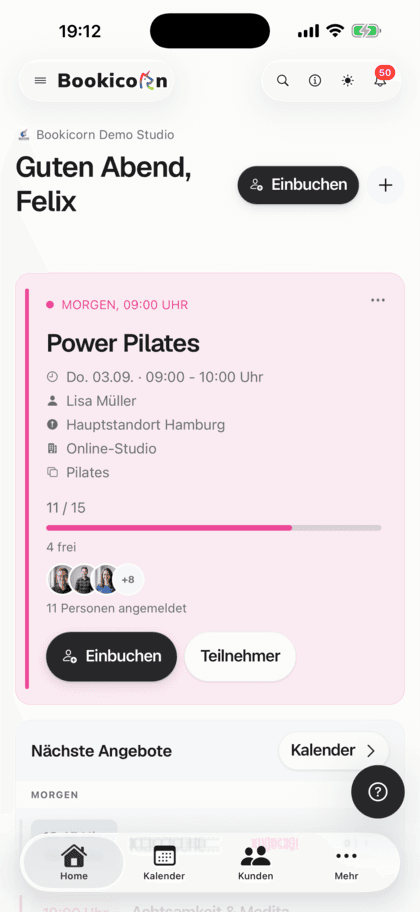
In the Manager, the bell shows what's new: bookings, cancellations, waitlists, purchases, new clients and reviews. Filter, read, done.
What notifications and reminders can do
For your clients, for you and for your team, each with its own settings.
All featuresReminder before the session
Once turned on, Bookicorn reminds every client 1 to 72 hours before by email and notification, once per booking. For rentals, the reminder comes the day before pickup.
Push in the client app
Confirmations, cancellations, waitlist spots, check-ins, open payments and messages arrive as notifications on the phone. One tap opens the right place, such as the bookings.
Clients decide for themselves
Every client turns notifications on themselves and chooses whether to get bookings, reminders, messages and announcements. They can turn off reminder emails.
Notifications in the Manager
The bell in the Manager shows new bookings, cancellations, requests, full sessions, waitlists, purchases, new clients, reviews and check-ins. With filters by category and Unread.
Emails per event
Choose which events send your studio an email, from booking requests to purchased gift cards. A second address can get the emails too if you like.
Emails for instructors
With the Trainer Portal add-on, you turn on emails for each instructor individually and choose the events: new booking, cancellation and waitlist, each for their own sessions.
Announcements to all clients
Write an announcement with a title and text, and it goes out as a notification with push to all active clients. You see previous announcements in the history.
Also included
- Notifications in the client app with Mark all as read
- Mark individually or all as read in the Manager
- New clients are reported to you through every channel
- Reservations and rentals with the Resources add-on
- System emails about your account and billing always active
- Tips and marketing from Bookicorn can be turned off
- Notification for new chat messages with the Messages & Course Chats add-on
Start for free, no demo call
Create your account and set everything up in a few minutes. The Free plan stays free forever, and for 14 days you can also try every feature.
- Start right away, no demo call
- No credit card needed
- Cancel monthly
 BookicornFree plan
How others set up their notifications
Three typical setups from different industries.
Pilates studio
Reminder the day before, emails only for cancellations and requests. The studio sees new bookings on the bell.
- Reminder
- 24 hrs before
- Emails
- Cancellation, request
Martial arts school
Every instructor gets emails about bookings and cancellations for their own groups, and management also sees everything on the bell.
- Instructor emails
- Booking, cancellation
- Add-on
- Trainer Portal
Music school
Before the holidays, an announcement goes to all clients, and reminders arrive two hours before the lesson.
- Reminder
- 2 hrs before
- Announcement
- to all clients
What others use together with notifications
Core features are included in every plan, add-ons you turn on when you need them.
Email automation
Booking confirmation, reminder, cancellation, waitlist and payment: Bookicorn sends the emails automatically, in your studio's design and the client's language.
Learn moreClient portal
Your studio's client portal: book and cancel sessions, buy credits, manage subscriptions, download invoices. In the browser and in the client app.
Learn moreMessages and chat
Direct messages and group chats with clients and team in the Manager. Your clients reply in the client portal or the client app and get a notification.
Learn moreWaitlist
When a session is full, clients join the waitlist and move up automatically as soon as someone cancels. With a payment deadline or booked right away.
Learn moreTrainer Portal
Their own login for every instructor in the Manager, with a role and individually adjustable permissions for menus, actions and client data.
Learn moreFrequently asked questions about notifications and reminders
Answered briefly. The first sentence is always the answer.
Can't find your question?
Write to usYes, as soon as you turn on session reminders under Settings, App. You choose 1 to 72 hours before, and every booking gets one reminder by email and a notification in the client app.
Still have questions about notifications and reminders?
Write to us in two minutes. You get a personal reply from people, not from a bot, and we tell you honestly whether Bookicorn is right for you.

Hi, I'm Daniel. Tell me briefly what you offer, and I'll tell you how to set it up in Bookicorn.
Daniel Haenle · replies personally

Ready to make sure nobody forgets a session?
Create your account, turn on session reminders and choose which emails you get. From the first booking, everyone stays in the loop. The Free plan stays free.
- 14 days of every feature
- No credit card
- 0% commission
- No minimum term

Ready to go in minutes
- Create your account
- Add your first offering
- 3Share your booking page