




Credit subscriptions: clients pay monthly, credits arrive automatically
Instead of selling a new pack every month, the subscription keeps running through Stripe or PayPal. With every payment, your client gets new credits added.
- Free plan, free forever
- No demo call, start right away
- No credit card
Updated 25 September 2026
Credit subscriptions at a glance
- takes one of your add-on slots
- Add-on
- billing and credits per period
- Month or year
- new credits with every payment
- Automatic
- all leftovers or up to a maximum
- Rollover
- the money goes directly to you
- Stripe or PayPal
- commission on your subscription payments
- 0%
What is a credit subscription?
A credit subscription is a class pack that renews automatically: your client pays monthly or yearly and gets new credits with every payment. In Bookicorn, you decide how many credits there are per period and whether unused credits expire or roll over. Payments run through Stripe or PayPal directly to you.
- Who it's for
- For studios with regulars who come every week: fitness, yoga, Pilates, martial arts, dance or horseback riding. Instead of selling a new pack every month, the membership simply keeps running.
- What you get
- Subscription packages with an interval, credits per period, expiry or rollover, and an overview of all subscriptions in the Manager.
- What it costs
- Credit Subscriptions is an add-on and takes one of your add-on slots. Bookicorn takes 0% commission on subscription payments, and only Stripe's or PayPal's fees apply.
How to get Credit Subscriptions
You turn on Credit Subscriptions in the Add-on Store of your Manager with one tap and can switch it off at any time. It uses one of your plan's add-on slots. Once all slots are taken, you can add it on in the paid plans.
- Applies to class packs you create as a subscription instead of a one-time purchase
- Requires Stripe or PayPal as a payment method
- Included in the 14-day trial
- Free
- 1 slot
- Starter
- 3 slots
- Professional
- 8 slots
- Premium
- all add-ons
Chasing payments every month?
- Did my bank transfer for September come through?
- My card is empty, can I pay for the new one next week?
- How many classes do I actually have left this month?
Selling new packs every month, matching payments and asking who still owes you. Regulars who forget to buy a new pack once quickly stop coming altogether.
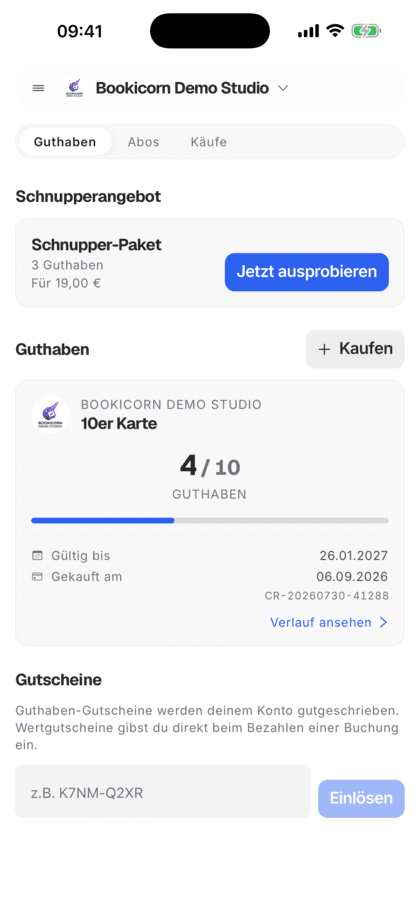
The subscription keeps running automatically through Stripe or PayPal. Every payment brings new credits, and your clients see what they have left in the client portal.
How to set up credit subscriptions
A subscription is a class pack with the type Subscription. You can offer subscriptions and one-time purchases side by side.
- 1
Create a subscription package
For a class pack, choose the type Subscription, plus monthly or yearly, how many credits there are per period and what happens to leftovers.
- 2
The client signs up
Your client picks the subscription in the client portal, accepts the terms and pays by Stripe or PayPal. With the Custom Terms add-on, they are your own terms.
- 3
Credits arrive automatically
With every successful payment, Bookicorn adds the credits and sends your client an email with new, rolled-over and expired credits.
What credit subscriptions can do in Bookicorn
From a monthly membership with eight sessions to a yearly plan: all in one class pack, billed through Stripe or PayPal.
All featuresMonthly or yearly
For each subscription package you choose monthly or yearly billing. With every payment, your client gets the credits for the new period.
Expiry at the next renewal
Unused credits expire as soon as the new ones are added. Alternatively, the class pack's validity rules apply, such as 60 days from purchase.
Rollover into the next period
Your client takes leftover credits into the next period, either all of them or up to a maximum. Anything above that expires, and the renewal email shows both.
Payment through Stripe or PayPal
Subscriptions run through your own Stripe account or your PayPal. The money goes directly to you, and Bookicorn takes no commission on the payments.
Self-service in the client portal
Your clients sign up for the subscription in the client portal and see credits per period, next payment, status and how many credits they've received in total.
Overview in the Manager
In the add-on settings you see your subscription packages and the active subscriptions, and in the client profile every subscription with status, price and next renewal.
Emails for you and your clients
Your client gets an email on sign-up, with every renewal and on cancellation. You get a notice as soon as a new subscription starts.
When a charge fails
Your client gets an email, and their subscription shows Payment pending in the client portal. New credits only come with a successful payment.
Also included
- Credits already added stay after cancellation
- Sign-up only with consent to the terms, with the Custom Terms add-on to your own
- Offer subscriptions and one-time purchases side by side
- Your own terms like points or punches apply to subscriptions too
- A note in the settings as long as Stripe is still missing
Start for free, no demo call
Create your account and set everything up in a few minutes. The Free plan stays free forever, and for 14 days you can also try every feature.
- Start right away, no demo call
- No credit card needed
- Cancel monthly
 BookicornFree plan
What credit subscriptions look like for you
Three typical setups from different industries. Each subscription package takes just a few minutes to create.
Fitness studio
Eight sessions a month, and unused ones expire with the next renewal.
- Interval
- monthly
- Credits
- 8 per month
- Expiry
- at next renewal
Yoga studio
Four classes a month, and up to two unused ones carry over into the next month.
- Interval
- monthly
- Credits
- 4 per month
- Rollover
- at most 2
Riding school
A yearly plan with a fixed allowance of riding lessons, valid for one year.
- Interval
- yearly
- Credits
- 40 per year
- Validity
- 12 months from purchase
Class pack or credit subscription?
Both are the same pack with a different way of paying. Here's which fits which client:
| Question | Class packIncluded in every planGo to page | Credit subscriptionAdd-onThis page |
|---|---|---|
| How does your client pay? | Once for the whole pack | Automatically every month or year |
| When do credits arrive? | Once at purchase | New with every payment |
| Unused credits | Expire according to your validity rule | Expire or roll over |
| Payment methods | Stripe, PayPal, bank transfer, cash | Stripe or PayPal |
| What you need | Nothing, in every plan | The Credit Subscriptions add-on |
What others use together with credit subscriptions
Core features are included in every plan, add-ons you turn on when you need them.
Class packs
Sell 10-class packs and other class packs online. Bookicorn deducts credits with every booking and shows your clients their balance.
Learn moreOnline payments with Stripe
Your clients pay online when booking by card, Apple Pay, Google Pay, Klarna and more. The money goes directly to you through Stripe, with no commission.
Learn moreNo commission
Bookicorn takes 0% commission on bookings, class packs and subscriptions. The money goes directly to you, and only the payment provider's fees apply.
Learn moreCustom Terms
Add your own terms and conditions in the Manager. Your clients accept them when booking, buying credits and subscribing, instead of Bookicorn's terms.
Learn moreClient portal
Your studio's client portal: book and cancel sessions, buy credits, manage subscriptions, download invoices. In the browser and in the client app.
Learn moreFrequently asked questions about credit subscriptions
Answered briefly. The first sentence is always the answer.
Can't find your question?
Write to usCredit Subscriptions takes one of your add-on slots, and there's no extra charge per subscription. Bookicorn takes 0% commission on payments, and only Stripe's or PayPal's fees apply.
Still have questions about credit subscriptions?
Write to us in two minutes. You get a personal reply from people, not from a bot, and we tell you honestly whether Bookicorn is right for you.

Hi, I'm Daniel. Tell me briefly what you offer, and I'll tell you how to set it up in Bookicorn.
Daniel Haenle · replies personally

Ready for predictable revenue every month?
Create your account, connect Stripe or PayPal and offer your first credit subscription. All add-ons are included in the 14-day trial, and you don't need a credit card.
- 14 days of every feature
- No credit card
- 0% commission
- No minimum term

Ready to go in minutes
- Create your account
- Add your first offering
- 3Share your booking page