




Multilingual booking system: everyone in their own language
German, English, Spanish, French, Italian, Dutch and Polish: your booking page speaks your studio's language, the client app and emails your clients' language, and the Manager yours.
- Free plan, free forever
- No demo call, start right away
- No credit card
Updated 25 September 2026
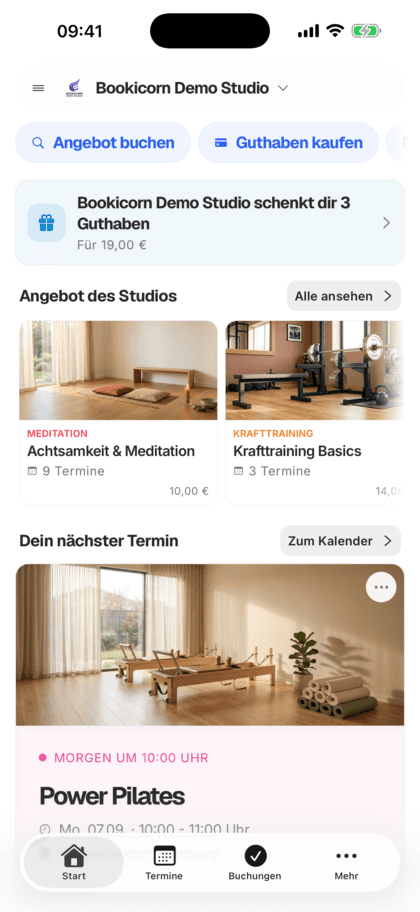
Seven languages at a glance
- from German to Polish
- 7 languages
- in your clients' language
- Emails
- in your studio's language
- Booking page
- own menu language in the Manager
- Per person
- language, currency and time zone
- Country suggestion
- even the Free plan
- In every plan
What is a multilingual booking system?
A multilingual booking system shows the booking page, client portal and emails in several languages, so clients can book and be informed in their own language. Bookicorn is available in 7 languages: German, English, Spanish, French, Italian, Dutch and Polish. Your booking page appears in your studio's language, and the client app and emails follow your clients' language. Text you write yourself, such as offering descriptions, appears exactly as you write it.
- Who it's for
- For studios with international clients, for teams with instructors from different countries and for studios outside the German-speaking region.
- What you get
- A booking page in your studio's language, the client app and emails in your clients' language, and a separate menu language for each person on the team.
- What it costs
- All 7 languages are included in every plan, even the Free plan for €0.
International clients, but emails in only one language?
- Sorry, I don't understand the confirmation email.
- Est-ce que ma réservation est confirmée ?
The confirmation arrives in your language only, the client from Lyon emails with questions, and you translate sessions and notes by hand.
Your clients set their language in the client app and get confirmations and reminders in that language.
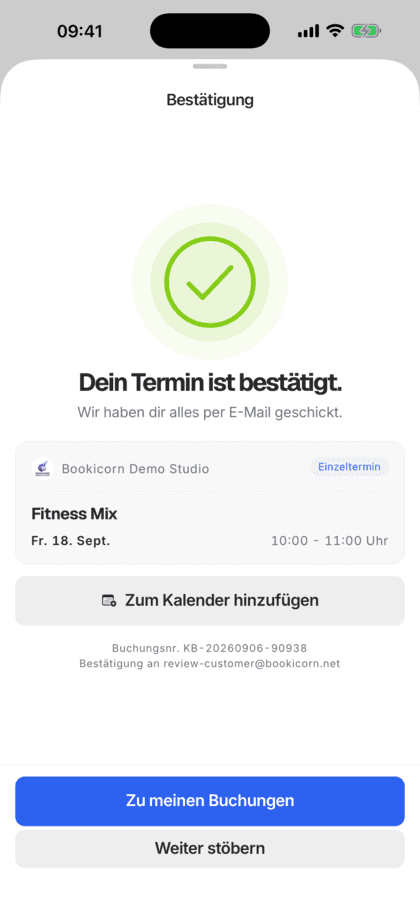
How everyone gets their own language
You set one language for your studio. Everything else, each person chooses for themselves.
- 1
Set the studio language
During setup, Bookicorn suggests the language based on your country. Under Settings, General you change your booking page's language at any time.
- 2
Clients choose their language
The client app starts in the device's language. If your clients choose another one, it's saved in their account.
- 3
Emails in the account language
Confirmations and reminders go out in the language of the client account. If none is set there, in your booking page's language.
What Bookicorn can do in seven languages
All of Bookicorn's text is translated. You only write your own content.
All features7 languages everywhere
Booking page, client portal, client app, Manager and emails are available in German, English, Spanish, French, Italian, Dutch and Polish, each language with all its text.
Booking page in your studio's language
Under Settings, General you set your booking page's language. Visitors see menus, the booking flow and notes in that language.
Emails in the client's language
Confirmations and reminders go out in the language saved in your client's account, otherwise in your booking page's language. Bookicorn maintains subject and text in all languages.
Client app in your clients' language
The client app starts in the device's language. If your clients choose another, it also applies to the client portal in the browser and to their emails.
Own menu language on the team
In the Manager, the menu language applies per person. It starts in the device's language, and in the settings you choose your own. Your clients aren't affected.
Suggestion based on your country
During setup, Bookicorn suggests the language, currency and time zone based on your country. You can change everything later in the settings.
Dates and amounts in the right format
Dates, times and amounts appear in the format of each language, so nobody trips over the day or the price.
Bookicorn's legal texts translated
Bookicorn's terms, privacy policy and data processing agreement are available in all 7 languages. Your own terms appear in the language you write them in.
Also included
- Language choice in the client app also applies to their emails
- Email templates are maintained and translated by Bookicorn
- A note if your terms are in a different language
- Studio language can be changed anytime in the settings
- Menu language only applies to you, not your clients
Start for free, no demo call
Create your account and set everything up in a few minutes. The Free plan stays free forever, and for 14 days you can also try every feature.
- Start right away, no demo call
- No credit card needed
- Cancel monthly
 BookicornFree plan
What goes well with seven languages
Core features are included in every plan, add-ons you turn on when you need them.
Booking website builder
Build your booking page from almost 30 blocks in the builder, in rows with up to four columns, with a preview for desktop, tablet and phone.
Learn moreEmail automation
Booking confirmation, reminder, cancellation, waitlist and payment: Bookicorn sends the emails automatically, in your studio's design and the client's language.
Learn moreClient portal
Your studio's client portal: book and cancel sessions, buy credits, manage subscriptions, download invoices. In the browser and in the client app.
Learn moreCustom terminology
Call your studio a practice or school, your team coaches or teachers and your class pack a stamp card: Bookicorn uses your terms everywhere.
Learn moreOn every device
Booking page, client portal and Manager adapt to every screen. The Manager and client app are also available for Android.
Learn moreCustom Terms
Add your own terms and conditions in the Manager. Your clients accept them when booking, buying credits and subscribing, instead of Bookicorn's terms.
Learn moreFrequently asked questions about languages in Bookicorn
Answered briefly. The first sentence is always the answer.
Can't find your question?
Write to usIn 7 languages: German, English, Spanish, French, Italian, Dutch and Polish. This applies to the booking page, client portal, client app, Manager and emails.
Still have questions about languages?
Write to us in two minutes. You get a personal reply from people, not from a bot, and we tell you honestly whether Bookicorn is right for you.

Hi, I'm Daniel. Tell me briefly what you offer, and I'll tell you how to set it up in Bookicorn.
Daniel Haenle · replies personally

Ready for bookings in seven languages?
Create your account, choose your booking page's language and invite your first clients. The Free plan stays free, and you don't need a credit card.
- 14 days of every feature
- No credit card
- 0% commission
- No minimum term

Ready to go in minutes
- Create your account
- Add your first offering
- 3Share your booking page