




Mobile-friendly booking system: on phone, tablet and desktop
Your clients book on your booking page in any browser, with a dedicated view on their phone. You manage everything in the Manager, in the browser or as an Android app.
- Free plan, free forever
- No demo call, start right away
- No credit card
Updated 25 September 2026
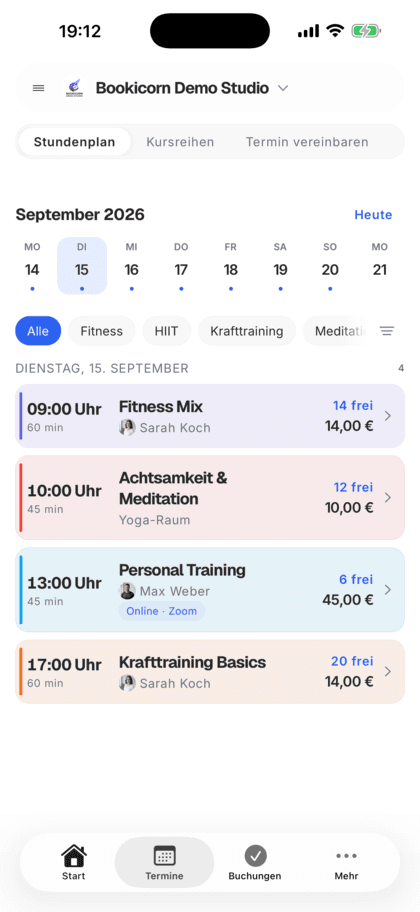
On every device at a glance
- booking page, client portal and Manager
- In the browser
- Manager and client app on Google Play
- Android
- a dedicated booking flow on the phone
- Phone view
- in the Manager on large screens
- Sidebar
- last loaded data without a connection
- Offline state
- even the Free plan
- In every plan
What is a mobile-friendly booking system?
A mobile-friendly booking system adapts to every screen, so clients book on their phone just like on a computer and you manage your sessions anywhere. At Bookicorn, the booking page runs in every current browser, and the booking flow has a dedicated view on the phone. You use the Manager in the browser or as an Android app, and your clients book in the client portal or the client app.
- Who it's for
- For studios, schools and instructors whose clients book from their phone and who want to keep track of sessions, participants and bookings on the go.
- What you get
- A booking page for every screen size, the Manager in the browser and for Android, the client portal in the browser and the client app for Android.
- What it costs
- The booking page, client portal and Manager are included in every plan, even the Free plan for €0. The client app in your design is available from the Starter plan.
Your clients book on their phone, but the page was built for desktop?
- I can't find the book button on my phone.
- Can you sign me up? I'm on the go right now.
- Who's actually coming at 6 PM today?
The booking page was made for the computer, and on the phone people scroll and zoom. And on the go, you can barely get to the participant list yourself.
The booking page adapts to every screen, and the booking flow has a dedicated view on the phone. You see sessions and participants in the Manager on your phone just like at your desk.
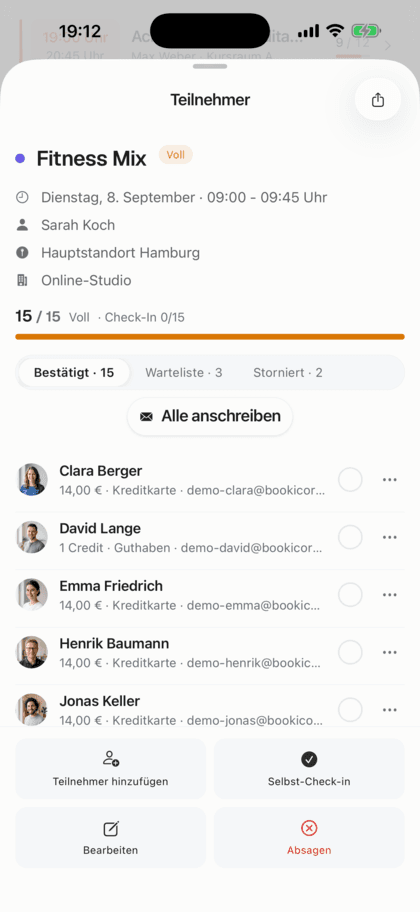
One system, three screens
You set everything up once. After that, it doesn't matter which device you or your clients are using.
- 1
Clients book on their phone
On narrow screens, your booking page's navigation becomes a menu. Summary, terms and book button are right in the last step.
- 2
You plan at your desk
In the browser, the Manager shows a sidebar instead of the tab bar from 1024 pixels wide. Sheets open there as windows.
- 3
On the go in the app
The Manager and client app are available for Android. Without a connection, the Manager shows a note and the last loaded state.
What Bookicorn can do on every device
The booking page, client portal and Manager come from one system. Your data is the same everywhere.
All featuresBooking page for every screen size
Your booking page runs in every current browser. On the phone, the navigation becomes a menu, and on the computer it sits at the top in the header.
Booking flow with a phone view
On small screens, summary, terms and book button are right in the last step. On large screens, a sidebar with price and session accompanies the whole flow.
Manager in the browser
You open the Manager at app.bookicorn.net in any browser, on a computer, tablet or phone. There's nothing to install.
The Manager adapts
On the phone, you navigate through the tab bar with Dashboard, Calendar, Clients and More. From 1024 pixels wide there's a sidebar that you can collapse.
Manager as an Android app
The Bookicorn Manager is available on Google Play, in every plan. With the Trainer Portal add-on, your team signs in too and sees what you share.
Client app and client portal
Your clients book, cancel and see their credits in the client app for Android or in the client portal in the browser. From Starter, the app shows your logo, your colors and your font.
Last loaded state without a connection
The Manager and client app remember loaded data for up to a week and start with it. Without a connection, the Manager shows a note.
One account on every device
You sign in with the same account in the browser and in the app and see the same sessions, clients and bookings everywhere.
Also included
- Link, QR code and poster for the client app from Starter
- Notifications on the phone in the client app
- Unlock the client app with fingerprint or face recognition
- The client portal in the browser is the same as in the app
- Booking embedded on your website with the Website Integration add-on
- Sheets in the Manager open as windows on the computer
- Sidebar in the Manager narrow or wide
Start for free, no demo call
Create your account and set everything up in a few minutes. The Free plan stays free forever, and for 14 days you can also try every feature.
- Start right away, no demo call
- No credit card needed
- Cancel monthly
 BookicornFree plan
Booking page, client portal or Manager?
Three interfaces from one system. Here's who uses what, where:
| Question | Booking pageIncluded in every planThis page | Client portalIncluded in every planGo to page | ManagerIncluded in every plan |
|---|---|---|---|
| Who it's for | Visitors to your page | Your clients with an account | You and your team |
| In the browser | Yes, on every screen size | Yes, on your booking page | Yes, at app.bookicorn.net |
| As an app | No, not needed | Client app for Android | Manager for Android |
| What you need | Nothing, in every plan | Nothing, app in your design from Starter | Nothing, in every plan |
What goes well with Bookicorn on every device
Core features are included in every plan, add-ons you turn on when you need them.
Booking website builder
Build your booking page from almost 30 blocks in the builder, in rows with up to four columns, with a preview for desktop, tablet and phone.
Learn moreClient portal
Your studio's client portal: book and cancel sessions, buy credits, manage subscriptions, download invoices. In the browser and in the client app.
Learn moreDark mode
The Manager, client app and booking page come in light and dark. All three follow the device, and anyone who wants to can switch themselves.
Learn moreSeven languages
Booking page, client app, Manager and emails in 7 languages: German, English, Spanish, French, Italian, Dutch and Polish.
Learn moreWebsite Integration
Embed your class schedule, upcoming sessions, prices and team as a widget in your existing website, with a code snippet for WordPress, Wix and more.
Learn moreThemes and branding
Design templates, your own colors, fonts, logo and favicon: your booking page, website widget and emails in your studio's look.
Learn moreFrequently asked questions about Bookicorn on phone, tablet and desktop
Answered briefly. The first sentence is always the answer.
Can't find your question?
Write to usYes. Your booking page runs in every current browser on phone, tablet and computer, and the booking flow has a dedicated view on small screens.
Still have questions about Bookicorn on your devices?
Write to us in two minutes. You get a personal reply from people, not from a bot, and we tell you honestly whether Bookicorn is right for you.

Hi, I'm Daniel. Tell me briefly what you offer, and I'll tell you how to set it up in Bookicorn.
Daniel Haenle · replies personally

Ready for bookings from every device?
Create your account in the browser, put your first offerings online and open your booking page on your phone. The Free plan stays free, and you don't need a credit card.
- 14 days of every feature
- No credit card
- 0% commission
- No minimum term

Ready to go in minutes
- Create your account
- Add your first offering
- 3Share your booking page