




Group booking: one booking for everyone
With group booking, your clients sign up family, friends or colleagues in one go, or book for someone else, such as their own child. Each person takes a spot, and you decide whether they cost extra.
- Free plan, free forever
- No demo call, start right away
- No credit card
Updated 25 September 2026
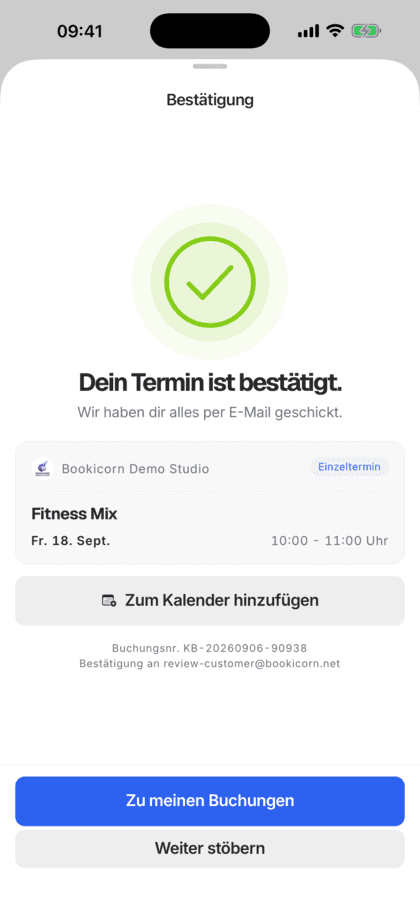
Group booking at a glance
- everyone in one booking
- One go
- only as many as there are open spots
- One spot per person
- you decide whether companions pay
- With or without a price
- for every person with an email address
- Own email
- takes one add-on slot, even on the Free plan
- Add-on
- commission on your bookings
- 0%
What is group booking?
Group booking is a booking for several people in one go: when booking, your client adds more people by name, and each takes their own spot in the session. In Bookicorn, anyone not attending themselves books for someone else, and the first person entered takes the spot. You decide whether companions cost extra or just take a spot.
- Who it's for
- For offerings where clients bring others along: parents with kids, friends at a workshop, couples at dance class or teams at a company event.
- What you get
- More people when booking, booking for someone else, saved people, a separate confirmation per person, and people who can be added or removed later.
- What it costs
- Group Booking is an add-on and takes one add-on slot in your plan, which already works on the Free plan. You pay 0% commission on your bookings.
How to get Group Booking
You turn on Group Booking in the Add-on Store of your Manager with one tap and can switch it off at any time. It uses one of your plan's add-on slots. Once all slots are taken, you can add it on in the paid plans.
- When booking fixed sessions and appointments, not for reservations with resources
- For blocks, people are added afterwards, for the whole block or individual sessions
- Setting Additional people cost extra, on or off
- Your team books in the Manager with companions and a price per person
- Free
- 1 slot
- Starter
- 3 slots
- Professional
- 8 slots
- Premium
- all add-ons
Every extra person is a separate message?
- Can I sign up my daughter too?
- There are three of us. Does each of us have to book?
- I'm not coming myself. Can I still book for my son?
Every extra person needs their own booking, their own account or a message to you. In the end you add names by hand and check whether there's still room.
Your client enters everyone in one booking and pays in one step. In the session you see each person with their own spot.
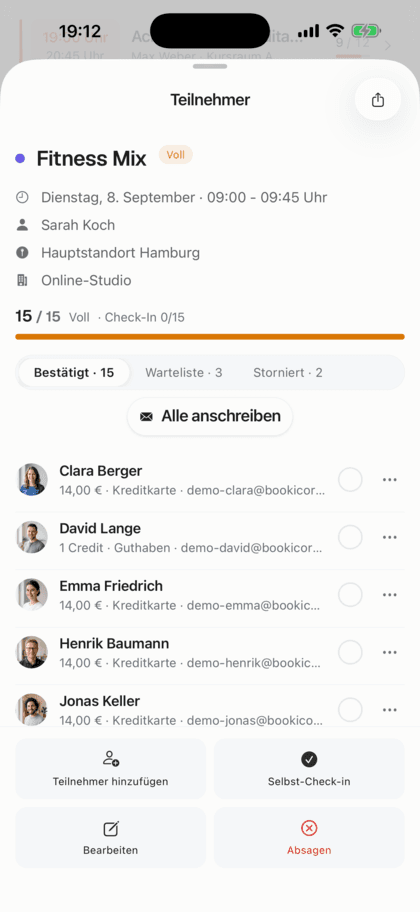
How a group booking works
You set once whether companions pay. Your clients take care of the rest when booking.
- 1
Set the price for companions
Turn on the add-on and decide whether each additional person pays the full price or just takes a spot.
- 2
The client adds people
When booking, your client adds more people or picks saved ones. Anyone with an email address gets their own confirmation.
- 3
Add people later
If someone else joins, your client adds the person in the client portal, and for blocks for the whole block or individual sessions.
What group booking can do
From a mother with two kids to a group of friends: everything in one booking.
All featuresMore people when booking
Your client adds people by name, and email is optional. Bookicorn only allows as many as there are open spots and checks this again for everyone when booking.
Book for someone else
If the person booking doesn't attend themselves, they switch to I'm booking for someone else. The first person entered takes their spot, while payment and confirmation stay with them.
Companions with or without a price
With Additional people cost extra, each person pays the full price. If you turn it off, companions just take a spot and payment is made once. The server calculates this, not the browser.
A separate confirmation per person
Anyone entered with an email gets their own email with session and location and sees who signed them up.
Saved people
Clients with an account save people they often bring along and pick them directly next time. In their profile they manage the list of people they bring.
Add or remove people
In the client portal and the client app, clients add people to an existing booking as long as spots are open. They also remove individual people there.
In the Manager with a price per person
Your team books clients in with companions, adds people to an existing booking and sets its own price per person if needed.
Also included
- Payment with credits, online, on site or by bank transfer
- Total price for everyone in the summary
- A second sign-up with the same email for a session is rejected
- If the person booking cancels, their companions are removed too
- Also for appointments with several spots
- Without a client account too, with the Guest Booking add-on
Start for free, no demo call
Create your account and set everything up in a few minutes. The Free plan stays free forever, and for 14 days you can also try every feature.
- Start right away, no demo call
- No credit card needed
- Cancel monthly
 BookicornFree plan
How studios use group booking
Four typical setups, depending on who comes along and who pays.
Swimming school
Parents sign up their kids without getting in the water themselves. Each child takes a spot and pays.
- Booking
- for someone else
- Additional people
- cost extra
Parent and child gym
An adult comes with each child. The companion takes a spot, and payment is made once.
- Additional people
- free
- Spots
- one per person
Pottery workshop
Three friends book together, and each gets her own confirmation with session and location.
- People
- until all spots are taken
- Confirmation
- per person with email
Dance school
Couples book together. The dance partner is saved and joins with one tap next time.
- Additional people
- cost extra
- Saved
- dance partner
What others use together with group booking
Core features are included in every plan, add-ons you turn on when you need them.
Guest Booking
Clients book without an account or login, name and email are enough. Allow it per offering or switch your whole studio to guest-only booking.
Learn moreBlock courses
Sell a fixed series of sessions as a package: one booking, one payment, every session booked. With several blocks per offering and late entry.
Learn moreClass packs
Sell 10-class packs and other class packs online. Bookicorn deducts credits with every booking and shows your clients their balance.
Learn moreWaitlist
When a session is full, clients join the waitlist and move up automatically as soon as someone cancels. With a payment deadline or booked right away.
Learn moreAvailable spots display
Your clients see how many spots are left for every session, on the booking page and in the client app. Sessions filling up or full are clearly marked.
Learn moreClient portal
Your studio's client portal: book and cancel sessions, buy credits, manage subscriptions, download invoices. In the browser and in the client app.
Learn moreFrequently asked questions about group booking
Answered briefly. The first sentence is always the answer.
Can't find your question?
Write to usYes, with the Group Booking add-on. Your clients add more people by name when booking, each takes their own spot, and payment happens in one step.
Still have questions about group booking?
Write to us in two minutes. You get a personal reply from people, not from a bot, and we tell you honestly whether Bookicorn is right for you.

Hi, I'm Daniel. Tell me briefly what you offer, and I'll tell you how to set it up in Bookicorn.
Daniel Haenle · replies personally

Ready for bookings with the whole group?
Create your account in a few minutes, turn on Group Booking and decide whether companions pay. The Free plan stays free, and you don't need a credit card.
- 14 days of every feature
- No credit card
- 0% commission
- No minimum term

Ready to go in minutes
- Create your account
- Add your first offering
- 3Share your booking page