




Calendar sync: sessions automatically in Google and iCloud
Connect your Google or iCloud calendar, and Bookicorn adds every session there with occupancy and participants. Every instructor connects their own calendar and sees their sessions.
- Free plan, free forever
- No demo call, start right away
- No credit card
Updated 25 September 2026
Calendar sync at a glance
- connected by signing in with Google
- Google Calendar
- with an app-specific password
- Apple iCloud
- “Bookicorn · your studio name”
- Its own calendar
- of sessions ahead when you connect
- 90 days
- management all sessions, instructors their own
- Per person
What is calendar sync?
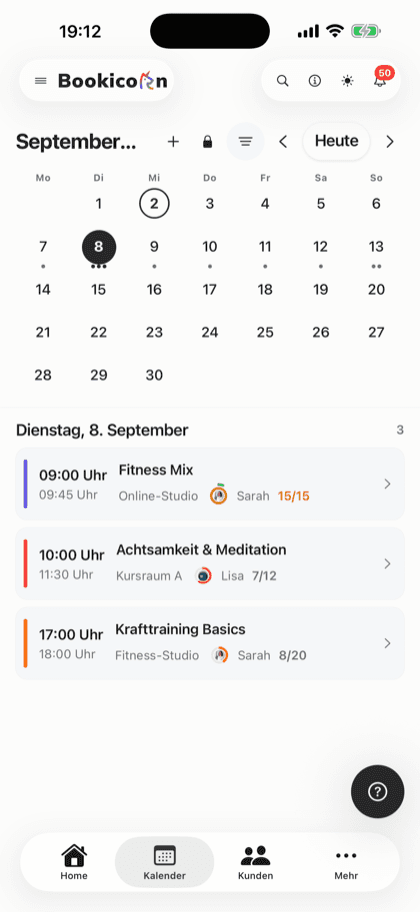
With calendar sync, your Bookicorn sessions appear automatically in your Google or Apple iCloud calendar, including occupancy, instructor, location and participant names. Bookicorn creates a separate calendar for this and keeps it up to date: new sessions, changes, cancellations and bookings land there on their own. As studio management you get all sessions, and every instructor connects their own calendar and gets the sessions of their offerings.
- Who it's for
- For studio managers and instructors who plan their day in their phone calendar and don't want to open the Manager for every glance.
- What you get
- Google and iCloud, a separate calendar per account, entries with occupancy and participants, automatic updates, and status and re-sync in the Manager.
- What it costs
- The Calendar Synchronization add-on takes one add-on slot in your plan. It's included in the 14-day trial.
How to get Calendar Synchronization
You turn on Calendar Synchronization in the Add-on Store of your Manager with one tap and can switch it off at any time. It uses one of your plan's add-on slots. Once all slots are taken, you can add it on in the paid plans.
- You connect Google or iCloud yourself, and every instructor their own calendar.
- The sync goes one way: from Bookicorn to your calendar.
- Included in the 14-day trial.
- Free
- 1 slot
- Starter
- 3 slots
- Professional
- 8 slots
- Premium
- all add-ons
Keeping sessions in two places, the studio and your phone?
- Has the Thursday class been moved now?
- How many are coming tonight?
- The session wasn't in my calendar.
Sessions live in the studio system, but the day is planned in the phone calendar. Every change has to be copied over by hand, and someone always misses it.
Every session appears automatically in your own calendar, with occupancy and location. Changes and cancellations follow on their own.
Connected in three steps
Connect once, and after that the sync runs in the background.
- 1
Connect your calendar
Sign in with Google or enter your Apple ID and an app-specific password. There's a guide for this right in the Manager.
- 2
Sessions arrive
Bookicorn creates the calendar “Bookicorn · your studio name” and adds the sessions of the next 90 days.
- 3
Stays up to date
New sessions, changes, cancellations and bookings land in the calendar automatically. In the Manager you see when it last synced.
What calendar sync can do
Bookicorn writes your sessions into a separate calendar. Your private events next to it stay untouched.
All featuresGoogle Calendar
You sign in with Google, and Bookicorn creates a separate calendar “Bookicorn · Studio name” in your account and only writes there.
Apple iCloud Calendar
With your Apple ID and an app-specific password, so Bookicorn never learns your regular Apple password. A step-by-step guide is right in the Manager.
For you and your team
As studio management you get all of the studio's sessions. Every instructor connects their own calendar and gets the sessions of their offerings. You can take this permission away from instructors.
Automatically up to date
New, changed, canceled and deleted sessions as well as new bookings sync on their own. If a sync fails, Bookicorn tries again.
Everything important in the entry
The title shows occupancy, such as “8/12 spots”, and for one-on-one sessions the person's name. The description lists instructor, category, participants and a link to the Manager, with the address as the location.
The next 90 days right away
When you connect, Bookicorn adds all active sessions of the next 90 days. After that, every new session is added automatically.
Status and control
In the Manager you see the status, connected account, calendar name and last sync. With “Sync again” you trigger the sync, and with “Disconnect” you end it.
Also included
- Canceled sessions carry “[Canceled]” in the title and no longer block time
- Session texts in your studio's language
- Multi-day rentals as one entry from pickup to return, with the Resources add-on
- Google and iCloud possible at the same time
- Connect in the Manager in the browser, on iOS and on Android
Start for free, no demo call
Create your account and set everything up in a few minutes. The Free plan stays free forever, and for 14 days you can also try every feature.
- Start right away, no demo call
- No credit card needed
- Cancel monthly
 BookicornFree plan
How studios use calendar sync
Four typical setups from different industries.
Yoga studio
The owner sees all of the studio's classes in her Google calendar, with occupancy in the title.
- Role
- Studio management
- Calendar
- Sessions
- all of the studio's
Personal training
The trainer plans on his iPhone. One-on-one sessions carry the client's name in the title.
- Role
- Instructor
- Calendar
- iCloud
- Title
- Offering · client name
Music school
Every teacher connects their own calendar and only sees their lessons.
- Role
- per teacher
- Calendar
- Google or iCloud
Massage practice
Treatments booked online as appointments appear right away in the practice calendar.
- Offering type
- Appointments
- Calendar
What others use together with calendar sync
Core features are included in every plan, add-ons you turn on when you need them.
Calendar overview
All your studio's sessions as week, month, day or list, with occupancy, instructor and room. Plus filters and the open hours for appointments.
Learn moreStaff management
All your instructors with profile, qualifications and sessions in one place. Assign them to offerings, plan substitutes and keep internal notes.
Learn moreTrainer Portal
Their own login for every instructor in the Manager, with a role and individually adjustable permissions for menus, actions and client data.
Learn moreClass and appointment scheduling
Single sessions, recurring series and appointments in one system, plus session blocks and rentals as add-ons. With the same payment methods and booking rules.
Learn moreNotifications and reminders
Reminders before the session, push in the client app, notifications in the Manager and emails about new bookings. You decide who hears about what.
Learn moreFrequently asked questions about calendar sync
Answered briefly. The first sentence is always the answer.
Can't find your question?
Write to usGoogle Calendar and Apple iCloud Calendar. Bookicorn currently doesn't connect other calendars such as Outlook directly.
Still have questions about calendar sync?
Write to us in two minutes. You get a personal reply from people, not from a bot, and we tell you honestly whether Bookicorn is right for you.

Hi, I'm Daniel. Tell me briefly what you offer, and I'll tell you how to set it up in Bookicorn.
Daniel Haenle · replies personally

Ready to see your sessions in your own calendar?
Create your account, test all features and add-ons for 14 days and connect your Google or iCloud calendar. You don't need a credit card.
- 14 days of every feature
- No credit card
- 0% commission
- No minimum term

Ready to go in minutes
- Create your account
- Add your first offering
- 3Share your booking page