




Payment reminders by email: follow up on open payments
If a bank transfer is still pending, you send your client a reminder with amount, bank details and payment reference in one tap. Bookicorn keeps count of how often you've already reminded them.
- Free plan, free forever
- No demo call, start right away
- No credit card
Updated 25 September 2026
Payment reminders at a glance
- right from your transactions
- In every plan
- reminder with all payment details
- One tap
- how many reminders have gone out
- Counted
- adjust the template in your email templates
- Your own text
- email in your client's language
- 7 languages
- invoices past the payment term, as an add-on
- Overdue
What are payment reminders in Bookicorn?
Payment reminders are emails you send from the Manager to clients with a pending bank transfer, such as for a class pack, with the amount, order number, your bank details and the payment reference. You trigger every reminder yourself, and Bookicorn counts how often you've reminded. With the Invoicing System add-on, you also see which invoices are overdue based on your payment term.
- Who it's for
- For studios that also sell class packs by bank transfer, and for anyone who works with invoices and payment terms.
- What you get
- A reminder by email in one tap, a counter per payment, a customizable template and, with the Invoicing System add-on, a list of overdue invoices.
- What it costs
- Payment reminders are included in every plan, even the Free plan for €0. The overview of overdue invoices is part of the Invoicing System add-on.
Checking bank statements and writing to everyone one by one?
- What was the account number again?
- What payment reference should I use?
- Did you get my bank transfer yet?
You match bank statements, look up your bank details and write to everyone who hasn't paid yet, one by one. At some point you no longer know whom you've already reminded.
In Transactions you see open payments, send the reminder with bank details and payment reference in one tap and mark the payment as paid as soon as the money is in.
How to follow up on open payments
Using the example of a class pack a client orders by bank transfer.
- 1
The order comes in
Your client gets the payment details by email, and you get a notification. The payment shows as open in your transactions.
- 2
Send a reminder
In the transaction details you tap Send payment reminder. Bookicorn sends the email and keeps count.
- 3
Mark as paid
Once the money is in, you mark the payment as paid. This releases the credits, and your client can book.
What payment reminders can do in Bookicorn
Not a collections process with escalation levels, but a quick, friendly reminder when a payment is taking its time.
All featuresReminder in one tap
In the details of an open payment, you send a payment reminder by email without writing any text yourself. Studio admins do this right from Transactions.
All payment details in the email
The reminder lists amount, order number and order date, your bank details with payment reference and, if saved, your PayPal address with a PayPal.me button.
Counted
In the transaction details you see how many reminders have already gone out. So you know whom you've already reminded twice.
Your own text
You adjust the Payment reminder template in your email templates. With the default template, the email goes out in the language your client has set.
Mark as paid
Once the payment is in, you mark it as paid. For a class pack, Bookicorn releases the credits.
Overdue invoices
With the Invoicing System add-on, you set a payment term. Once it has passed, the invoice is marked overdue in its own tab, and you send it again by email.
Also included
- Payment details already go out by email with the order
- A notification to you with every bank transfer order
- Clients see in the client portal that their payment is still being checked
- Note in the email: already paid, then simply ignore it
- Payment term from invoice or service date, with the invoicing system
- No automatic reminders, you decide when
Start for free, no demo call
Create your account and set everything up in a few minutes. The Free plan stays free forever, and for 14 days you can also try every feature.
- Start right away, no demo call
- No credit card needed
- Cancel monthly
 BookicornFree plan
What others use together with payment reminders
Core features are included in every plan, add-ons you turn on when you need them.
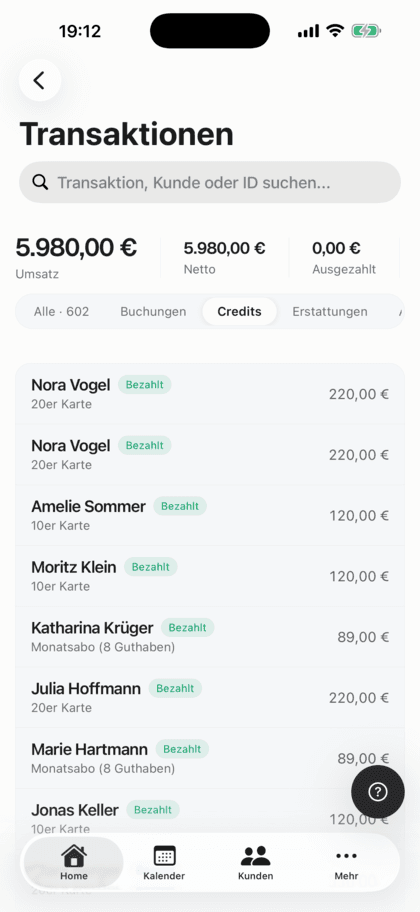
Transaction overview
All your studio's payments in one list: with status, payment reminders, Stripe fees and payout status.
Learn moreClass packs
Sell 10-class packs and other class packs online. Bookicorn deducts credits with every booking and shows your clients their balance.
Learn moreInvoicing system
Automatic invoices and cancellation invoices for bookings, credit and gift card purchases, with ZUGFeRD PDF and a copy to your accounting.
Learn moreEmail automation
Booking confirmation, reminder, cancellation, waitlist and payment: Bookicorn sends the emails automatically, in your studio's design and the client's language.
Learn moreOnline payments with Stripe
Your clients pay online when booking by card, Apple Pay, Google Pay, Klarna and more. The money goes directly to you through Stripe, with no commission.
Learn moreFrequently asked questions about payment reminders
Answered briefly. The first sentence is always the answer.
Can't find your question?
Write to usNo, you trigger every reminder yourself. One tap in the transaction details is enough, and Bookicorn counts how often you've already reminded.
Still have questions about payment reminders?
Write to us in two minutes. You get a personal reply from people, not from a bot, and we tell you honestly whether Bookicorn is right for you.

Hi, I'm Daniel. Tell me briefly what you offer, and I'll tell you how to set it up in Bookicorn.
Daniel Haenle · replies personally

Ready to collect open payments faster?
Create your account, add your bank details and sell your first class pack by bank transfer. The Free plan stays free.
- 14 days of every feature
- No credit card
- 0% commission
- No minimum term

Ready to go in minutes
- Create your account
- Add your first offering
- 3Share your booking page