




Booking without a client account: name and email are enough
With guest booking, new clients book your sessions without creating an account or logging in first. You allow it per offering or switch your whole studio to guest-only booking.
- Free plan, free forever
- No demo call, start right away
- No credit card
Updated 25 September 2026
Guest booking at a glance
- first name, last name and email are enough
- No password
- or for all offerings with one click
- Per offering
- your whole studio without a login
- Guest-only booking
- takes one add-on slot, even on the Free plan
- Add-on
- commission on your bookings
- 0%
- for you and your guests
- 7 languages
What is guest checkout?
Guest checkout is a booking without a client account: your clients enter their first name, last name and email address and book without a login or password. In Bookicorn, the confirmation arrives by email, with personal access that lets the guest view their booking later with a code. You allow guest booking per offering or switch your whole studio over with guest-only booking.
- Who it's for
- For anyone where many clients book for the first time or only once: workshops, first aid trainings, cooking evenings, trial classes or drop-in classes.
- What you get
- Booking without an account on your booking page and in the client app, approval per offering or for all, the guest-only booking mode and guests with their own badge in your client list.
- What it costs
- Guest Booking is an add-on and takes one add-on slot in your plan, which already works on the Free plan. You pay 0% commission on your bookings.
How to get Guest Booking
You turn on Guest Booking in the Add-on Store of your Manager with one tap and can switch it off at any time. It uses one of your plan's add-on slots. Once all slots are taken, you can add it on in the paid plans.
- Allow it per offering or for all active offerings with one click
- Guest-only booking switches your whole studio to booking without a login
- Your team also books new guests in directly in the Manager
- With the Vouchers add-on, gift cards can be bought without an account too
- Free
- 1 slot
- Starter
- 3 slots
- Professional
- 8 slots
- Premium
- all add-ons
New clients drop off at sign-up?
- I just want to book the workshop on Saturday. Do I really need to create an account for that?
- The password email never came. Can you just sign me up?
Anyone who only comes once doesn't want to create a password. The booking gets abandoned or ends up as a message to you, and you enter it by hand.
New clients book with name and email in one go. You see the booking right away, and the guest gets their confirmation by email.
How a guest booking works
Once it's allowed, there's nothing more for you to do. Regulars book with their account as usual.
- 1
Allow guest booking
Turn on the add-on and allow guest booking in the offering, for all offerings at once or studio-wide with guest-only booking.
- 2
The client books as a guest
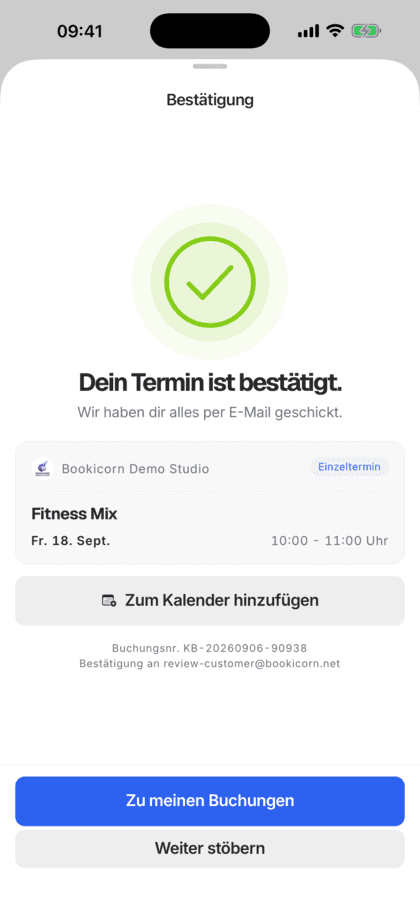
Your client chooses As a guest, enters name and email and pays like with any booking. The confirmation arrives by email, with a button to their personal access.
- 3
The guest in your client list
Guests appear with the Guest badge in your client list. If a guest sets a password later, it becomes a client account with all their bookings.
What guest booking can do
From a single workshop to a studio that works entirely without client accounts.
All featuresApproval per offering
You turn guest booking on or off in each offering, or with one click for all active offerings. An overview shows you how many offerings allow it.
Guest-only booking
Your whole studio books without client accounts, for fixed sessions, blocks and appointments. Sign-in and the account menu disappear from your booking page, and your clients see the form directly.
Personal access by code
The booking confirmation includes access to the client portal. There the guest signs in with a 6-digit code sent by email, on the web or in the client app.
No duplicate clients
If an email has booked as a guest before, a code to sign in comes instead of creating a second client. If it belongs to an account, Bookicorn asks the client to sign in.
Address only when invoicing
Phone is optional. The form only asks for the address if the booking creates an invoice, meaning with the invoicing system and for paid offerings.
From guest to account
Signed-in guests see a Create account note in the client portal and only need to set a password. Their details and bookings are kept.
Also included
- A Booking without an account possible note on the offering page
- Your team books new guests in the Manager
- Guests with the Guest badge in the client list
- Email is asked twice for safety
- Payment online, by bank transfer or on site
- Gift card purchases without an account with the Vouchers add-on
Start for free, no demo call
Create your account and set everything up in a few minutes. The Free plan stays free forever, and for 14 days you can also try every feature.
- Start right away, no demo call
- No credit card needed
- Cancel monthly
 BookicornFree plan
How studios use guest booking
Four typical setups. Regulars and guests run in one system.
First aid training
Participants usually only come once. The whole studio books without client accounts.
- Mode
- Guest-only booking
- Details
- Name and email
- Payment
- online or bank transfer
Cooking school
Individual cooking evenings bookable as a guest, the series for regulars only with an account.
- Guest booking
- on for cooking evenings
- Series
- account required
Yoga studio
Trial class and workshops without an account. Anyone who stays sets a password later and books with credits.
- Guest booking
- Trial class, workshops
- Regulars
- Account and 10-class pack
Creative studio
Workshops bookable as a guest, and gift cards to give away without an account too.
- Guest booking
- for all offerings
- Gift card purchase
- allowed without an account
What others use together with guest booking
Core features are included in every plan, add-ons you turn on when you need them.
Group Booking
Your clients book for several people in one go or for someone else. You decide whether companions cost extra.
Learn moreBooking website builder
Build your booking page from almost 30 blocks in the builder, in rows with up to four columns, with a preview for desktop, tablet and phone.
Learn moreWebsite Integration
Embed your class schedule, upcoming sessions, prices and team as a widget in your existing website, with a code snippet for WordPress, Wix and more.
Learn moreGift cards
Sell gift cards online, send them as a PDF by email and redeem them at booking. Plus discount codes and code batches for partners.
Learn moreClient management
A client list with search and filters, client records with bookings, credits, notes and invoices, plus CSV export and GDPR-compliant removal.
Learn moreOnline payments with Stripe
Your clients pay online when booking by card, Apple Pay, Google Pay, Klarna and more. The money goes directly to you through Stripe, with no commission.
Learn moreFrequently asked questions about guest booking
Answered briefly. The first sentence is always the answer.
Can't find your question?
Write to usYes, with the Guest Booking add-on. Your clients choose As a guest in the booking step and enter their first name, last name and email address, and they don't need a password.
Still have questions about guest booking?
Write to us in two minutes. You get a personal reply from people, not from a bot, and we tell you honestly whether Bookicorn is right for you.

Hi, I'm Daniel. Tell me briefly what you offer, and I'll tell you how to set it up in Bookicorn.
Daniel Haenle · replies personally

Ready for bookings without client accounts?
Create your account in a few minutes, turn on Guest Booking and allow it for your first offerings. The Free plan stays free, and you don't need a credit card.
- 14 days of every feature
- No credit card
- 0% commission
- No minimum term

Ready to go in minutes
- Create your account
- Add your first offering
- 3Share your booking page