All Bookicorn features at a glance
Bookicorn brings booking, payments, clients and your team together in one system. Every feature has its own page here: what is included in every plan, what you add as an add-on and what costs extra as a Pay add-on.
Bookicorn in numbers
- features with their own page
- 64
- add-ons you can turn on
- 25
- Free plan, forever
- €0
- commission on your bookings
- 0 %
Booking types
How your clients book: scheduled sessions, series, blocks, free appointment booking or reserving a resource.
3 features
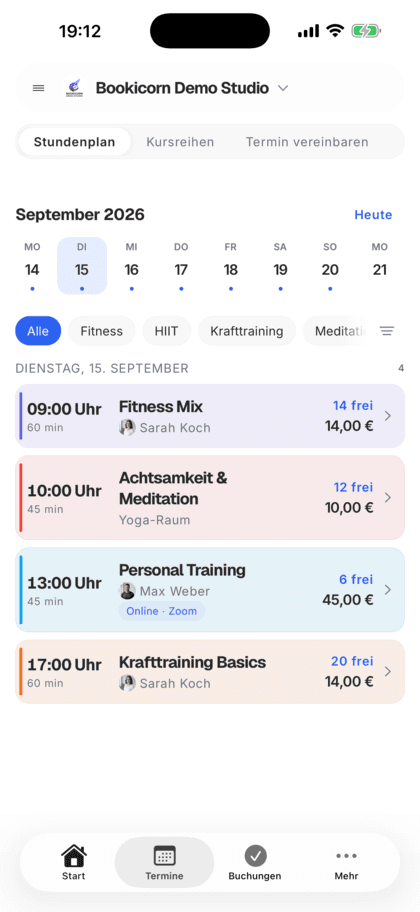
Class and appointment scheduling
Single sessions, recurring series and appointments in one system, plus session blocks and rentals as add-ons. With the same payment methods and booking rules.
Learn moreBlock courses
Sell a fixed series of sessions as a package: one booking, one payment, every session booked. With several blocks per offering and late entry.
Learn moreResources and reservations
Let clients reserve cabins, courts, equipment, animals and rental items online: with units, pricing rules, deposits and a calendar per resource.
Learn moreBookings
Everything around a single booking, from booking at the front desk to the waitlist.
11 features
Guest Booking
Clients book without an account or login, name and email are enough. Allow it per offering or switch your whole studio to guest-only booking.
Learn moreGroup Booking
Your clients book for several people in one go or for someone else. You decide whether companions cost extra.
Learn moreWaitlist
When a session is full, clients join the waitlist and move up automatically as soon as someone cancels. With a payment deadline or booked right away.
Learn moreDigital attendance
Clients check themselves into the session by QR code or location. You see in the Manager who is there and check in exceptions by hand.
Learn moreRebooking
Clients and your team move a booking to another session without canceling and booking again. The payment moves along, and the waitlist moves up.
Learn moreBooking rules and cancellation policy
Set the booking window, booking cutoff, cancellation deadline and payment methods for each offering. Bookicorn applies them to every booking.
Learn moreManual bookings and walk-ins
Your team books members and new guests in themselves, with payment method, price and a warning before a session gets overbooked.
Learn moreCancel and reschedule sessions
Cancel sessions or whole series with a reason, or reschedule them. Bookings, refunds and emails to your clients run automatically.
Learn moreAttendance tracking
A participant list for every session, as a PDF to check off at the door or as a CSV for spreadsheets. Check off digitally with the Digital Attendance add-on.
Learn moreBooking approval
You decide per offering: bookings are confirmed right away or come in as requests you approve. With a deadline and reminder so none get left behind.
Learn moreAvailable spots display
Your clients see how many spots are left for every session, on the booking page and in the client app. Sessions filling up or full are clearly marked.
Learn moreCalendar and scheduling
Your class schedule, your views and the connection to your own calendar.
7 features
Online classes
Switch an offering to online, choose Zoom, Teams, Meet or Webex and add the link. Your clients get it with their booking.
Learn moreZoom Integration
Bookicorn creates a separate Zoom meeting for every booked online session. Your customers get the link automatically.
Learn moreClass schedule views
Show your sessions as a weekly calendar, daily schedule, session list or offering tiles. Clients filter by category, instructor, time of day and location.
Learn moreDesigning offerings
Give every offering a description, cover image, gallery, color, categories, difficulty level and notes. With its own address, link and QR code.
Learn moreCalendar overview
All your studio's sessions as week, month, day or list, with occupancy, instructor and room. Plus filters and the open hours for appointments.
Learn moreCalendar Synchronization
Your sessions automatically in Google or iCloud Calendar, with occupancy and participants. Management sees every session, each instructor their own.
Learn moreAvailability profiles
Set once when you can be booked: hours per weekday, individual open days and closed periods for vacations or holidays.
Learn moreClients
Client data, the client portal and the notes from your sessions.
4 features
Adding clients
Add clients yourself in the Manager and invite them by email, or let them sign up when booking. Everyone ends up in your client list.
Learn moreClient management
A client list with search and filters, client records with bookings, credits, notes and invoices, plus CSV export and GDPR-compliant removal.
Learn moreDocumentation
Notes on every session right from the session and a private storage for intake forms, consents and contracts. Only your team sees them.
Learn moreClient portal
Your studio's client portal: book and cancel sessions, buy credits, manage subscriptions, download invoices. In the browser and in the client app.
Learn moreCommunication
Emails, reminders and messages that go out on their own.
3 features
Email automation
Booking confirmation, reminder, cancellation, waitlist and payment: Bookicorn sends the emails automatically, in your studio's design and the client's language.
Learn moreMessages and chat
Direct messages and group chats with clients and team in the Manager. Your clients reply in the client portal or the client app and get a notification.
Learn moreNotifications and reminders
Reminders before the session, push in the client app, notifications in the Manager and emails about new bookings. You decide who hears about what.
Learn morePayments
How you get paid: credits, subscriptions, online payment and invoices.
11 features
Class packs
Sell 10-class packs and other class packs online. Bookicorn deducts credits with every booking and shows your clients their balance.
Learn moreCredit Subscriptions
Sell credits as a subscription: your clients pay monthly or yearly through Stripe or PayPal, and new credits arrive automatically with every payment.
Learn moreOnline payments with Stripe
Your clients pay online when booking by card, Apple Pay, Google Pay, Klarna and more. The money goes directly to you through Stripe, with no commission.
Learn moreNo commission
Bookicorn takes 0% commission on bookings, class packs and subscriptions. The money goes directly to you, and only the payment provider's fees apply.
Learn moreRefunds
When you cancel a booking, Bookicorn refunds online payments automatically through Stripe or PayPal and returns credits. Cash payments become a reminder.
Learn morePayment reminders
If a bank transfer is still pending, you send your client a payment reminder with all payment details in one tap. Bookicorn keeps count.
Learn moreTransaction overview
All your studio's payments in one list: with status, payment reminders, Stripe fees and payout status.
Learn moreInvoicing system
Automatic invoices and cancellation invoices for bookings, credit and gift card purchases, with ZUGFeRD PDF and a copy to your accounting.
Learn moreDATEV Export
A month's invoices and cancellation invoices as a CSV in the DATEV posting batch format, with your accounts, ready to hand to your German tax advisor.
Learn moreRevenue and statistics
Revenue and occupancy on the dashboard compared to the previous period, plus net, revenue sources and key figures per offering and per client.
Learn moreSubsidized offerings
Internal class packs for sponsored clients, a billing note per offering and a block that explains the funding programs on your booking page.
Learn moreTeam
Access, permissions and pay for your team.
3 features
Staff management
All your instructors with profile, qualifications and sessions in one place. Assign them to offerings, plan substitutes and keep internal notes.
Learn moreTrainer Portal
Their own login for every instructor in the Manager, with a role and individually adjustable permissions for menus, actions and client data.
Learn moreTrainer Payouts
Self-employed instructors get their share automatically through Stripe with every online payment. For employees, you record an hourly rate or flat fee.
Learn moreOrganization
Rooms, locations and how they are booked.
3 features
Room management
Create rooms per location with capacity, size and amenities, and assign them to your offerings and individual sessions.
Learn moreLocation management
Several locations in one account: each with address, map pin and its own rooms, visible on the booking page and in the client app.
Learn moreOccupancy Management
Double-booking warnings for rooms and instructors, blocked days for rooms and locations, maintenance per room and only free room times for appointments.
Learn moreMarketing and reviews
Win new clients and show what others say.
6 features
Trial Offers
Free or discounted trial packs that clients redeem online, with a redemption limit per person.
Learn moreGift cards
Sell gift cards online, send them as a PDF by email and redeem them at booking. Plus discount codes and code batches for partners.
Learn moreInvitation campaigns
Invite new clients by email with a personal link and see per campaign who clicked and signed up.
Learn moreReviews
Your clients review your studio with stars and text. You approve every review before it appears on your booking page.
Learn moreReview management
All client reviews in the Manager: approve, decline or delete, with the star average and the person's bookings in view.
Learn moreReview widget
Star average and approved client reviews on your booking page, as cards, a carousel or a quote, and with an add-on on your website too.
Learn moreBooking page and design
Your own page: layout, design, wording and domain.
8 features
Studio profile page
Your public studio page with sessions, prices, team, reviews and FAQ, bookable right there and with its own sitemap for Google.
Learn moreOffering page
Every offering gets its own page with its own link: description, sessions with open spots, price, instructor, location and gallery, bookable right there.
Learn moreVisibility control
You decide when your booking page goes live: set it up in peace and look at it with a test link, then open it to everyone and Google with one switch.
Learn moreCustom domain
Your booking page at your own address like book.yourstudio.com instead of bookicorn.net, with redirects, https and links in all emails.
Learn moreWebsite Integration
Embed your class schedule, upcoming sessions, prices and team as a widget in your existing website, with a code snippet for WordPress, Wix and more.
Learn moreCustom terminology
Call your studio a practice or school, your team coaches or teachers and your class pack a stamp card: Bookicorn uses your terms everywhere.
Learn moreThemes and branding
Design templates, your own colors, fonts, logo and favicon: your booking page, website widget and emails in your studio's look.
Learn moreBooking website builder
Build your booking page from almost 30 blocks in the builder, in rows with up to four columns, with a preview for desktop, tablet and phone.
Learn moreSecurity and usability
Data protection, your own terms and conditions, and a system that works everywhere.
5 features
GDPR and data protection
Servers in Frankfurt, a data processing agreement at sign-up, account deletion by clients and legal pages on your booking page. In every plan.
Learn moreCustom Terms
Add your own terms and conditions in the Manager. Your clients accept them when booking, buying credits and subscribing, instead of Bookicorn's terms.
Learn moreOn every device
Booking page, client portal and Manager adapt to every screen. The Manager and client app are also available for Android.
Learn moreDark mode
The Manager, client app and booking page come in light and dark. All three follow the device, and anyone who wants to can switch themselves.
Learn moreSeven languages
Booking page, client app, Manager and emails in 7 languages: German, English, Spanish, French, Italian, Dutch and Polish.
Learn moreHow add-ons work
Add-ons are extensions you turn on in the Manager with one tap. Every plan has add-on slots. Once all are taken, you can add more add-ons in the paid plans. Pay add-ons such as your own domain are always billed separately and do not use a slot.
- Free
- 1 slot
- Starter
- 3 slots
- Professional
- 8 slots
- Premium
- all add-ons
Frequently asked questions about the features
What most people want to know first.
Can't find your question?
Write to usAll core features are included in the Free plan, plus one add-on slot of your choice. There are limits on the number of clients, instructors and bookings per month; the pricing page lists them exactly.