




Check-in app: attendance without a paper list
Your clients check themselves in when they arrive, by QR code or by location in the client app. You see in the Manager who is already there and only check off exceptions by hand.
- Free plan, free forever
- No demo call, start right away
- No credit card
Updated 25 September 2026
Digital attendance at a glance
- two ways to check in on their own
- QR code or location
- until 30 minutes after the end
- 1 hr before
- radius for check-in by location
- 200 meters
- your team checks in from the participant list
- By hand
- and only once per session
- Only with a booking
- takes one add-on slot, even on the Free plan
- Add-on
What is digital attendance tracking?
With digital attendance, your clients check themselves into the session, by QR code or by location in the client app, instead of ticking their name on a paper list. Bookicorn checks that a confirmed booking exists and the time window is open. In the Manager you see who is already there and check clients in by hand when needed.
- Who it's for
- For studios with fixed sessions where the front desk gets crowded at the start: fitness and yoga classes, martial arts, workshops or trainings that need proof of attendance.
- What you get
- Check-in by QR code and by location, a code to put up, the list of attendees per session, manual check-in and a notification with every self check-in.
- What it costs
- Digital attendance is an add-on and takes one add-on slot in your plan, which already works on the Free plan. You pay 0% commission on your bookings.
How to get Digital attendance
You turn on Digital attendance in the Add-on Store of your Manager with one tap and can switch it off at any time. It uses one of your plan's add-on slots. Once all slots are taken, you can add it on in the paid plans.
- You decide studio-wide which ways apply: QR code, location or both
- Checking in by hand from the participant list is also part of the add-on
- Instructors check people in with the Mark attendance permission
- Free
- 1 slot
- Starter
- 3 slots
- Professional
- 8 slots
- Premium
- all add-ons
A paper list at the front desk and a line before class?
- Do you still have Tuesday's list? I can't find it.
- Can you quickly check if I'm signed up? I'm not on the list.
At the start everyone crowds the front desk, you look for names on the list and tick them off. Afterwards you type up the attendance, or the list gets lost.
Your clients check themselves in when they arrive. You see in the Manager who is already there and only check off exceptions by hand.
How the digital check-in works
Once it's set up, all you need per session is one tap to open the code.
- 1
Choose the ways
Decide whether clients can check themselves in and in which ways. The setting applies to all sessions in your studio.
- 2
The client checks in
From one hour before the start, your client taps Check in on their booking. They scan the code you opened in the Manager, or confirm with I'm here that they are on site.
- 3
You see who's there
The session counts attendees next to bookings. You get a notification with every self check-in.
What digital attendance can do
From the code at the entrance to checking people off at the edge of the mat: attendance goes straight into the session.
All featuresQR code check-in
You open the check-in for a session, and the Manager shows the code. You put it up where it's visible or share it as an image, and your clients scan it with the client app.
Check-in by location
With I'm here, the app checks that your client is no more than 200 meters from the session's location. What counts is the location of the session, otherwise that of the offering or your studio.
A clear time window
Check-in runs from one hour before the start until 30 minutes after the end. The code is valid from when you open it until 30 minutes after the end, and Close check-in ends it earlier.
Only with a confirmed booking
Bookicorn only checks in people with a confirmed booking for the session, and each person only once. For canceled sessions, check-in is locked.
Check in by hand
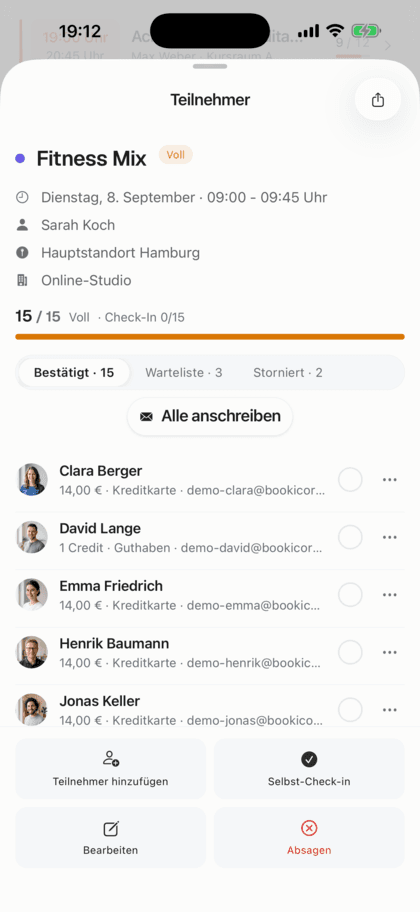
In the participant list you check clients in by hand or undo a check-in. This works at any time, even when self check-in is closed.
Who's already there
In the session's check-in you see the attendees and how many have booked. The overview shows the day's latest check-ins.
A notification with every check-in
When someone checks themselves in, you get a notification with name and offering.
Also included
- Share or save the code as an image
- Number of people checked in for the next session on the overview
- Message everyone who checked in today
- The client app updates right away when you check someone in by hand
- Instructors with the Mark attendance permission
- Individual ways can be turned off studio-wide
Start for free, no demo call
Create your account and set everything up in a few minutes. The Free plan stays free forever, and for 14 days you can also try every feature.
- Start right away, no demo call
- No credit card needed
- Cancel monthly
 BookicornFree plan
How studios use the check-in app
Four typical setups, depending on whether there's a front desk.
Fitness studio
Full classes in the evening. The code stands at the entrance, and clients scan it as they come in.
- Way
- QR code
- Code
- put up at the entrance
Yoga studio without a front desk
A small studio with nobody at the counter. Clients tap I'm here as soon as they arrive.
- Way
- Location
- Radius
- 200 meters
Continuing education
Attendance needs to be recorded. Anyone arriving late is checked in by hand by the instructor.
- Way
- QR code
- Latecomers
- by hand in the list
Martial arts school
The instructor checks people off at the edge of the mat, and clients don't check themselves in.
- Self check-in
- off
- Attendance
- by hand in the list
What others use together with the check-in app
Core features are included in every plan, add-ons you turn on when you need them.
Attendance tracking
A participant list for every session, as a PDF to check off at the door or as a CSV for spreadsheets. Check off digitally with the Digital Attendance add-on.
Learn moreManual bookings and walk-ins
Your team books members and new guests in themselves, with payment method, price and a warning before a session gets overbooked.
Learn moreLocation management
Several locations in one account: each with address, map pin and its own rooms, visible on the booking page and in the client app.
Learn moreClient portal
Your studio's client portal: book and cancel sessions, buy credits, manage subscriptions, download invoices. In the browser and in the client app.
Learn moreNotifications and reminders
Reminders before the session, push in the client app, notifications in the Manager and emails about new bookings. You decide who hears about what.
Learn moreTrainer Portal
Their own login for every instructor in the Manager, with a role and individually adjustable permissions for menus, actions and client data.
Learn moreFrequently asked questions about digital attendance
Answered briefly. The first sentence is always the answer.
Can't find your question?
Write to usYour clients check themselves in with the client app, by QR code or by location. Bookicorn checks the booking and time window and records attendance right in the session.
Still have questions about the check-in app?
Write to us in two minutes. You get a personal reply from people, not from a bot, and we tell you honestly whether Bookicorn is right for you.

Hi, I'm Daniel. Tell me briefly what you offer, and I'll tell you how to set it up in Bookicorn.
Daniel Haenle · replies personally

Ready to get rid of the paper list?
Create your account in a few minutes, turn on Digital Attendance and open the check-in at your next session. The Free plan stays free, and you don't need a credit card.
- 14 days of every feature
- No credit card
- 0% commission
- No minimum term

Ready to go in minutes
- Create your account
- Add your first offering
- 3Share your booking page