




Branding: your booking system in your studio's look
Choose a design template and match colors, fonts, logo and details to your brand design. Your booking page, offering pages, website widget and emails then look like you.
- Free plan, free forever
- No demo call, start right away
- No credit card
Updated 25 September 2026
Themes and branding at a glance
- with their own font and layout
- Design templates
- separately for light and dark
- 11 colors
- for headings and body text
- 2 fonts
- with a switch for visitors
- Light and dark
- page, widget and emails
- Everywhere
How do I customize my booking system's design?
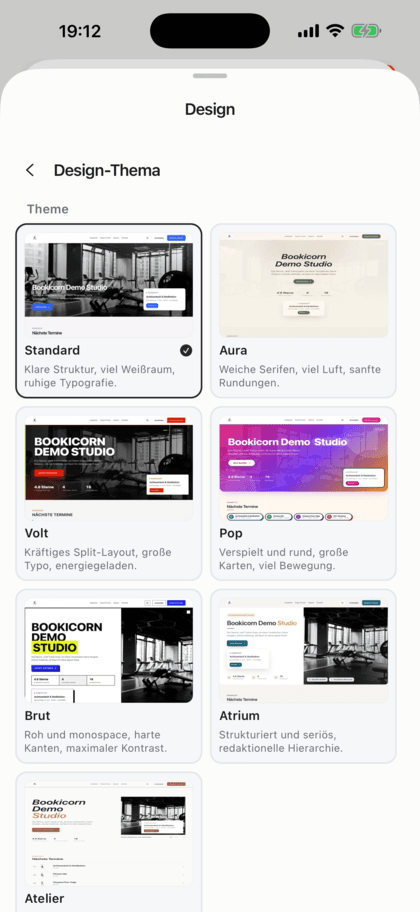
You customize your booking system's design in your booking page builder: you choose a design template as a starting point and set colors, fonts, logo, favicon and details like corners, spacing and shadows to match your brand design. In Bookicorn, your offering pages, the widget for your website and the emails to your clients use the same design. If you like, visitors switch between light and dark mode themselves.
- Who it's for
- For studios, schools and instructors with their own logo and colors who don't want booking to look like someone else's software.
- What you get
- Design templates with their own layout, 11 color values for light and dark, fonts for headings and text, logo, favicon, header and finishing touches.
- What it costs
- Themes and branding are included in every plan. On the Free plan for €0 you use the basic design templates with Bookicorn branding, and from the Starter plan all templates with your own logo, colors and fonts.
What you set in your design
Everything in one place in the Manager. What you save, clients see right away on your booking page.
All featuresDesign templates
Templates like Standard, Aura, Volt or Atelier come with their own fonts and page layout. When you switch, colors, logo and header are kept.
Your own colors
Primary color, buttons, accent, background, surface, borders, headings, text, secondary text and footer, separately for light and dark mode. Empty fields take the template's color.
Fonts
One font each for headings and body text from a curated selection, such as Playfair Display, Fraunces, Poppins or Montserrat, all without license fees.
Logo and favicon
Your logo in the header in four sizes, plus your favicon for the browser tab.
Finishing touches
Corner radius, density, shadows, spacing between sections, page width, border thickness and small headings above the sections.
Light and dark
Decide whether your page starts in light or dark, and show visitors a switch if you like.
Header
Minimal, with navigation or with quick booking, plus the menu position on the left, center or right.
The same design everywhere
Offering pages, the widget for your website and the emails to your clients use the colors, fonts, corners and logo of your booking page.
Also included
- Footer with Instagram, email, phone and website
- Button text color is chosen automatically for readability
- Back to the template's defaults with one tap
- Light and dark preview in the editor
What goes well with themes and branding
Core features are included in every plan, add-ons and pay add-ons you turn on when you need them.
Booking website builder
Build your booking page from almost 30 blocks in the builder, in rows with up to four columns, with a preview for desktop, tablet and phone.
Learn moreCustom terminology
Call your studio a practice or school, your team coaches or teachers and your class pack a stamp card: Bookicorn uses your terms everywhere.
Learn moreCustom domain
Your booking page at your own address like book.yourstudio.com instead of bookicorn.net, with redirects, https and links in all emails.
Learn moreWebsite Integration
Embed your class schedule, upcoming sessions, prices and team as a widget in your existing website, with a code snippet for WordPress, Wix and more.
Learn moreDark mode
The Manager, client app and booking page come in light and dark. All three follow the device, and anyone who wants to can switch themselves.
Learn moreStudio profile page
Your public studio page with sessions, prices, team, reviews and FAQ, bookable right there and with its own sitemap for Google.
Learn moreFrequently asked questions about themes and branding
Answered briefly. The first sentence is always the answer.
Can't find your question?
Write to usYes. You enter your colors for primary color, buttons, background, text and other areas, separately for light and dark mode. Anything you leave empty is taken from the selected template.
Still have questions about themes and branding?
Write to us in two minutes. You get a personal reply from people, not from a bot, and we tell you honestly whether Bookicorn is right for you.

Hi, I'm Daniel. Tell me briefly what you offer, and I'll tell you how to set it up in Bookicorn.
Daniel Haenle · replies personally

Ready to give your booking page your look?
Create your account, choose a design template and set colors, fonts and logo. You try all features in the 14-day trial, and you don't need a credit card.
- 14 days of every feature
- No credit card
- 0% commission
- No minimum term

Ready to go in minutes
- Create your account
- Add your first offering
- 3Share your booking page