




Room scheduling: spot double bookings early
Bookicorn warns you while planning when a room or instructor is already scheduled at the same time. Blocked days for rooms and locations and a maintenance toggle keep your calendar clean.
- Free plan, free forever
- No demo call, start right away
- No credit card
Updated 25 September 2026
Occupancy management at a glance
- takes one add-on slot, even on the Free plan
- Add-on
- double-booking warning while planning
- Room and instructor
- block for a period or every week
- Room or location
- booked room times can't be booked
- Appointments
- blocks as a lane behind the sessions
- In the calendar
- commission on your bookings
- 0%
What is occupancy management for rooms?
Occupancy Management is an add-on for your room scheduling that makes double bookings visible and records blocked times for rooms and locations. When you plan a session in the Manager, Bookicorn warns you if the room or instructor is already scheduled at the same time and shows blocks and maintenance. For appointments, Bookicorn doesn't even offer times when the room is already taken.
- Who it's for
- For studios and schools where several instructors and offerings share a few rooms, and for anyone who wants to record holidays, cleaning or renovations in their room planning.
- What you get
- Double-booking warnings for rooms and instructors, blocked days for rooms and entire locations, recurring blocked times, maintenance per room and booked room times respected for appointments.
- What it costs
- Occupancy Management is an add-on and takes one add-on slot in your plan, which already works on the Free plan. You pay 0% commission on your bookings.
How to get Occupancy Management
You turn on Occupancy Management in the Add-on Store of your Manager with one tap and can switch it off at any time. It uses one of your plan's add-on slots. Once all slots are taken, you can add it on in the paid plans.
- Applies to individual rooms and to entire locations
- Warns when creating and editing individual sessions, and deliberate overbooking stays possible
- Appointments: times when the room is taken can't be booked
- With the Resources add-on, blocks also apply to reservations
- Free
- 1 slot
- Starter
- 3 slots
- Professional
- 8 slots
- Premium
- all add-ons
Two groups, one hall, same time?
- There are twelve of us outside the hall, but it's occupied!
- Did you know the small room is being renovated over the holidays?
- I have two sessions at the same time on Thursday, right?
Who uses which room when is only known by whoever has the plan in their head. Double bookings only surface when two groups are standing at the same door.
While planning, you see right away when a room or instructor is already scheduled. You enter renovations and holidays as blocks, visible to everyone in the calendar.
Clean room scheduling in three steps
Once it's set up, Bookicorn checks along with every session you plan or change.
- 1
Enter blocks
Block a room or an entire location for a period, such as the holidays, or every week at fixed times, with a reason if you like.
- 2
Plan sessions
When you create or change a session, Bookicorn shows blocks, maintenance and double bookings right in the form, with the session that overlaps.
- 3
Clients only book free times
For appointments, Bookicorn only offers times when both instructor and room are free, on the booking page and in the client app.
What occupancy management can do
From a studio with two halls to a school with several locations: room planning without surprises at the door.
All featuresDouble-booking warning
If you plan a session in a room that's already taken at the same time, Bookicorn shows the other session with title, time and instructor. You can still save.
Instructor scheduled twice
The same warning applies to instructors, even when an instructor is only assigned through the offering.
Blocked days for rooms and locations
Block a room or an entire location from one date to another, such as for holidays or a renovation. The reason appears in the notice.
Recurring blocked times
Choose weekdays and a time, such as Mondays from 1 PM to 2 PM for cleaning. The block then applies every week.
Maintenance toggle per room
Put a room into maintenance with one toggle, with a note for the team. It's marked in the room overview, and a notice appears while planning.
Blocks in the calendar
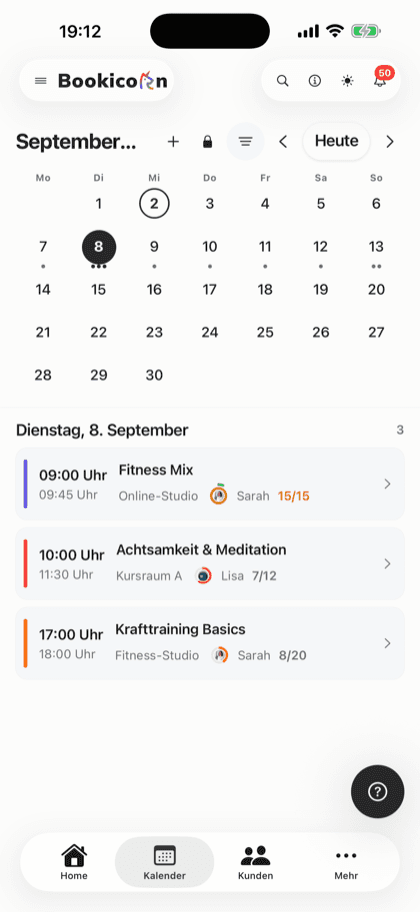
Blocks appear in the Manager calendar as a lane behind the sessions, in the week and day views. One tap opens the block.
Appointments without double bookings
For appointments, times when the room is already taken by bookings can't be booked: on the booking page, in the widget, in the client app and when booking someone in from the Manager.
For reservations too
With the Resources add-on, blocks and maintenance also apply to reservations: blocked resources and locations can't be reserved during the blocked period.
Also included
- All blocks in one list, to create, change and delete
- Create a block right from the room
- Placeholder sessions without bookings don't block appointments
- Also respected when rebooking to free times
- Instructors see room availability with the Rooms permission
- Blocks and warnings in the Manager on your phone and in the browser
Start for free, no demo call
Create your account and set everything up in a few minutes. The Free plan stays free forever, and for 14 days you can also try every feature.
- Start right away, no demo call
- No credit card needed
- Cancel monthly
 BookicornFree plan
What occupancy management looks like for you
Three typical setups from different industries. Each takes just a few minutes to set up.
Dance school
Two halls, many teachers: double bookings stand out while planning, and the whole school is blocked during summer break.
- Block
- Location, summer break
- Warning
- Room and instructor
- Private lessons
- appointments
Massage practice
Two treatment rooms, appointments booked by clients. Booked room times can't be booked, and there's cleaning at midday.
- Offering
- appointments
- Room
- Treatment 1
- Cleaning
- Mon to Fri, 1 PM to 2 PM
Yoga studio under renovation
The small hall is getting a new floor: maintenance on, with a note for the team, until everything is done.
- Maintenance
- Small Hall
- Note
- New floor until Oct 15
- In the calendar
- for the whole team
Room management alone or with occupancy management?
You can manage rooms in every plan. The add-on adds occupancy checks:
| Question | Room managementIncluded in every planGo to page | Occupancy ManagementAdd-onThis page |
|---|---|---|
| Rooms, capacity, locations | Yes, in every plan | Yes |
| Room double-booked | No warning | Warning while planning |
| Instructor scheduled twice | No warning while planning | Warning while planning |
| Appointments | Blocks the instructor's booked times | Also blocks the room's booked times |
| Blocked days and maintenance | Not included | For rooms and entire locations |
| Blocks in the calendar | Not included | As a lane behind the sessions |
What others use together with occupancy management
Core features are included in every plan, add-ons you turn on when you need them.
Room management
Create rooms per location with capacity, size and amenities, and assign them to your offerings and individual sessions.
Learn moreLocation management
Several locations in one account: each with address, map pin and its own rooms, visible on the booking page and in the client app.
Learn moreResources and reservations
Let clients reserve cabins, courts, equipment, animals and rental items online: with units, pricing rules, deposits and a calendar per resource.
Learn moreClass and appointment scheduling
Single sessions, recurring series and appointments in one system, plus session blocks and rentals as add-ons. With the same payment methods and booking rules.
Learn moreCalendar overview
All your studio's sessions as week, month, day or list, with occupancy, instructor and room. Plus filters and the open hours for appointments.
Learn moreStaff management
All your instructors with profile, qualifications and sessions in one place. Assign them to offerings, plan substitutes and keep internal notes.
Learn moreFrequently asked questions about occupancy management
Answered briefly. The first sentence is always the answer.
Can't find your question?
Write to usWith the Occupancy Management add-on, Bookicorn warns you when creating and editing a session if the room or instructor is already scheduled at the same time. For appointments, booked room times can't even be booked by clients.
Still have questions about occupancy management?
Write to us in two minutes. You get a personal reply from people, not from a bot, and we tell you honestly whether Bookicorn is right for you.

Hi, I'm Daniel. Tell me briefly what you offer, and I'll tell you how to set it up in Bookicorn.
Daniel Haenle · replies personally

Ready for room scheduling without surprises?
Create your account, add your rooms and turn on Occupancy Management. The Free plan stays free, and you don't need a credit card.
- 14 days of every feature
- No credit card
- 0% commission
- No minimum term

Ready to go in minutes
- Create your account
- Add your first offering
- 3Share your booking page