




Client portal: clients manage bookings, credits and subscriptions
Your clients see their next session, book, cancel within the deadline, buy credits and download their invoices. In the browser at your studio's address or in the client app.
- Free plan, free forever
- No demo call, start right away
- No credit card
Updated 25 September 2026

Client portal at a glance
- included even in the Free plan
- In every plan
- same client portal, same data
- Browser and app
- sign in with a link from the email
- No password
- for every purchase with an invoice
- Invoice as PDF
- your client chooses
- 7 languages
- servers, GDPR-compliant
- Frankfurt
What is a client portal?
A client portal is your clients' personal area where they manage their bookings, credits and subscriptions themselves. In Bookicorn, clients see their next session there, book new sessions, cancel within the cancellation deadline, buy credits and download invoices as PDF. It runs in the browser at your studio's address and as a client app, both with the same data.
- Who it's for
- For studios, schools and instructors whose clients book regularly, have credit packs or subscriptions, and shouldn't have to call for every question.
- What you get
- A home screen with the next session, the schedule, bookings with cancellation and calendar file, credits and subscriptions, purchases with invoices, profile, notifications and account deletion.
- What it costs
- The client portal is included in every plan, even the Free plan for €0. From Starter, the client app appears in the design of your booking page.
Every question about credits lands on your desk?
- How many classes do I have left?
- Can you take me off Thursday's class?
- Could you send me the invoice again?
Credits, cancellations and invoices all go through you. Every message means looking it up, replying, removing someone, and between sessions and closing time a lot gets left undone.
Your clients see their credits themselves, cancel within the deadline with one tap and download the invoice from their purchases. You only hear about what you need to know.
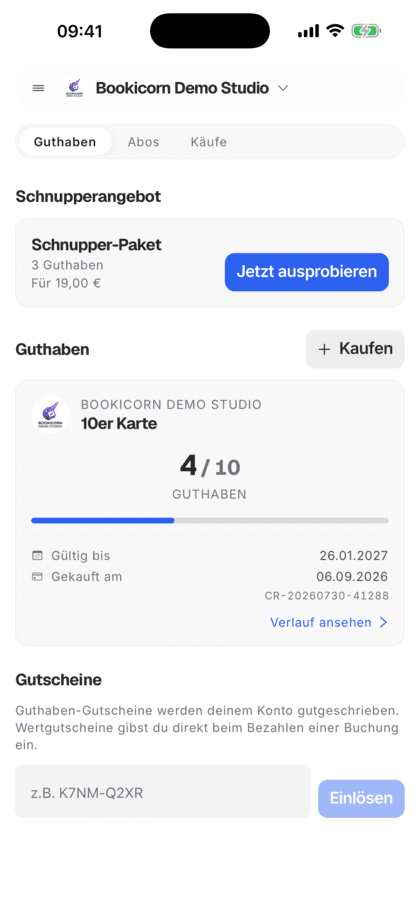
How your clients use the portal
From the first sign-in to the invoice: everything in one place, in the browser or in the app.
- 1
Sign in
With email and password, or without a password via a link from the email. Anyone who booked as a guest signs in with the code from the booking email.
- 2
Book and manage
Book from the schedule, add sessions to the calendar under Bookings, open the route or cancel within the deadline.
- 3
Credits and subscriptions
Buy more credits, redeem vouchers, start or cancel subscriptions and download the invoice as PDF for every purchase.
What the client portal can do
Everything your clients can handle themselves, they handle in the portal. You only set what you offer.
All featuresHome screen with the next session
The next session with a countdown, shortcuts to book and buy credits, and a notice when credits are about to expire or are almost used up.
Schedule and sessions
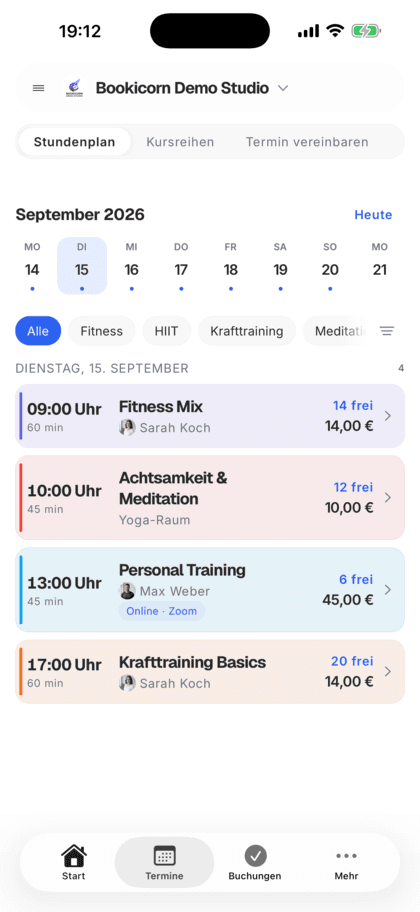
A schedule with week and month views, series and appointment booking, depending on what you offer. Filters for category, instructor, time of day, location and online, plus saved favorite offerings.
Bookings at a glance
Upcoming bookings, waitlist spots, open requests and history. Save sessions as a calendar file, open the route, join online sessions with one tap.
Cancel within the deadline
Within your cancellation deadline, clients cancel themselves, with a message to you if they like. The portal shows what gets refunded. After the deadline, it tells them to contact you.
Credits, subscriptions and vouchers
Credit packs with balance, validity and history, buying credits, redeeming vouchers. Start subscriptions by card or, if you offer it, by PayPal, cancel them and take the cancellation back.
Purchases and invoices
Every purchase with status and amount. Where there is an invoice, clients view it or download it as PDF.
Profile and people
Your client maintains their profile picture, contact details, address and emergency contact themselves. People they regularly bring along are saved as persons.
Sign in and delete the account
Sign in with a password or via a link from the email. Your client deletes their account themselves after a confirmation, their data is anonymized, invoices are kept.
Also included
- Turn notifications on and off by type
- Notifications with Mark all as read
- Add sessions to the device calendar (app)
- Choose language and dark mode themselves
- Several studios in one account
- Add a studio by search, invitation code or QR code
- Bookicorn's and your studio's terms with the date of consent
- Face ID or fingerprint in the app
- Guests turn their booking into an account
- Check in with the Digital Attendance add-on
- Rebook with the Rebooking add-on
- Chat with the Messages & Course Chats add-on
Start for free, no demo call
Create your account and set everything up in a few minutes. The Free plan stays free forever, and for 14 days you can also try every feature.
- Start right away, no demo call
- No credit card needed
- Cancel monthly
 BookicornFree plan
How clients use the portal
Three typical situations from different industries.
Yoga with a 10-class pass
The client sees on the home screen that only two classes are left, buys more and books the next session.
- Payment
- Credits
- Notice
- Credits almost used up
Dance school with a subscription
A couple starts the monthly subscription via PayPal. Before moving away, they cancel in the portal, and the subscription runs until the end of the minimum term.
- Subscription
- monthly
- Payment method
- PayPal
Swimming school for kids
A mother has saved her two children as persons and cancels in time when one of them is sick.
- Persons
- 2 children
- Cancellation
- up to 24 hrs. before
What others use together with the client portal
Core features are included in every plan, add-ons you turn on when you need them.
Class packs
Sell 10-class packs and other class packs online. Bookicorn deducts credits with every booking and shows your clients their balance.
Learn moreCredit Subscriptions
Sell credits as a subscription: your clients pay monthly or yearly through Stripe or PayPal, and new credits arrive automatically with every payment.
Learn moreBooking rules and cancellation policy
Set the booking window, booking cutoff, cancellation deadline and payment methods for each offering. Bookicorn applies them to every booking.
Learn moreClass schedule views
Show your sessions as a weekly calendar, daily schedule, session list or offering tiles. Clients filter by category, instructor, time of day and location.
Learn moreNotifications and reminders
Reminders before the session, push in the client app, notifications in the Manager and emails about new bookings. You decide who hears about what.
Learn moreFrequently asked questions about the client portal
Answered briefly. The first sentence is always the answer.
Can't find your question?
Write to usNo, the client portal also runs in the browser at your studio's address, with the same data as the app. The client app is available on Google Play, and the iPhone version is in preparation.
Still have questions about the client portal?
Write to us in two minutes. You get a personal reply from people, not from a bot, and we tell you honestly whether Bookicorn is right for you.

Hi, I'm Daniel. Tell me briefly what you offer, and I'll tell you how to set it up in Bookicorn.
Daniel Haenle · replies personally

Ready to give your clients their own space?
Create your account, add your offerings and send your clients the link. They book, cancel and buy credits themselves. The Free plan stays free.
- 14 days of every feature
- No credit card
- 0% commission
- No minimum term

Ready to go in minutes
- Create your account
- Add your first offering
- 3Share your booking page