




Automated emails: confirmation, reminder and cancellation on their own
Bookicorn confirms every booking, reminds before the session and reports cancellations, called-off sessions and open waitlist spots. With your logo, your colors and in your clients' language.
- Free plan, free forever
- No demo call, start right away
- No credit card
Updated 25 September 2026
Email automation at a glance
- included even in the Free plan
- In every plan
- every email in the client's language
- 7 languages
- reminder before the session
- 1 to 72 hrs
- your studio's logo and colors
- Your design
- for every template with sample data
- Test email
- servers, GDPR-compliant
- Frankfurt
Which automated emails does Bookicorn send?
Bookicorn sends automated emails for every step of a booking: confirmation, request and decline, reminder before the session, cancellation, called-off session, rebooking, waitlist and payment, plus emails about credits, subscriptions, gift cards and invoices. Bookicorn maintains the texts and translations, and every email arrives in the recipient's language. You decide the sender name, reply-to address, logo, header and footer, and the colors come from your booking page.
- Who it's for
- For anyone who no longer wants to confirm bookings by hand or remind clients of sessions one by one, from solo instructors to schools with several locations.
- What you get
- Automated emails for booking, reminder, cancellation, called-off sessions, waitlist, payment and credits, a preview and test email per template, and adjustable sender and design.
- What it costs
- Automated emails are included in every plan, even the Free plan for €0. Emails for add-ons like Waitlist or Credit Subscriptions come with the respective add-on.
Confirmations by hand and forgotten sessions?
- Did my sign-up for Saturday go through?
- When exactly was the session again?
- Did you get my cancellation?
You confirm every booking yourself, send reminders by WhatsApp the evening before, and anyone who cancels asks again just to be sure. Whoever forgets simply doesn't show up.
Your clients get a confirmation with the session details right away, a reminder before the session if you like, and a message when something changes. Replies come to you.
Set it up once, and it runs
The templates are ready. You only decide what your emails look like and whether reminders go out.
- 1
Sender and design
Under Settings, Email templates you enter the sender name and reply-to address, choose your logo position and add a header and footer if you like.
- 2
Turn on reminders
In the app settings you turn on session reminders and set how many hours before they arrive, between 1 and 72.
- 3
Preview and test email
Look at every template in your design and send yourself a test email with sample data. From then on, emails go out on their own with every booking.
What email automation can do
There's a ready-made template for every step of a booking. You don't have to write any text or maintain any translations.
All featuresBooking confirmation right away
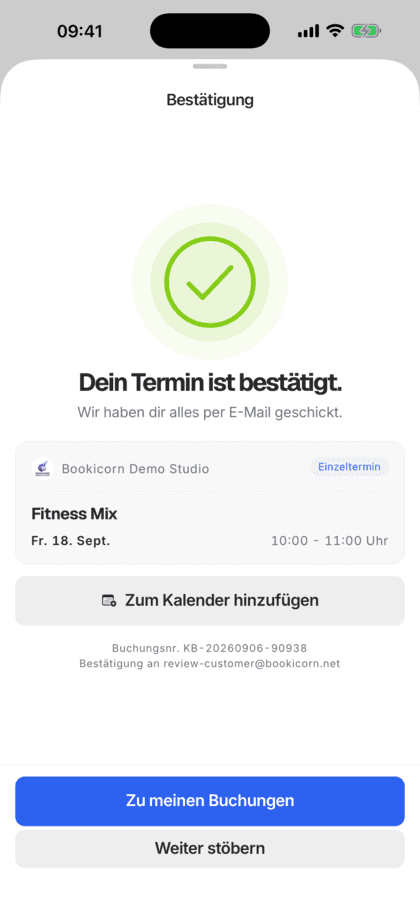
After every booking, your client gets the confirmation with the session details, the amount and until when they can cancel for free. For bookings with approval, the request comes first, then the confirmation or decline.
Reminder before the session
Turn it on, choose the hours, done: Bookicorn reminds every client once per booking by email and with a notification in the app. Reservations get their own reminder.
Cancellation, called-off sessions and rebooking
If a client cancels, you call off a session, rebook someone or reschedule a session, the people affected find out by email.
Waitlist
With the Waitlist add-on, clients get a confirmation when they join and an email as soon as they move up or a spot is held for them.
Payment, credits and subscriptions
Payment instructions for bank transfers, payment confirmation, notes when credits are added or used up, and emails about credit subscriptions.
In the client's language
Bookicorn provides subject and text in 7 languages. Every email goes out in the language your client has chosen.
In your studio's design
Bookicorn takes colors and light or dark from your booking page and the logo from your settings. You set the sender name, reply-to address, header and footer yourself.
Preview and test email
For every template you see a preview and send yourself a test email with sample data before your clients get it.
Also included
- Invitation with a password link for new clients
- Welcome email on sign-up through your page
- Password reset and sign-in link without a password
- Gift card with PDF after purchase
- Invoice attached as a PDF
- Payment reminder at the push of a button
- Emails for guests booked along
- Separate templates for reservations and rentals
- Clients can turn off reminder emails
- Your clients' replies go to your address
Start for free, no demo call
Create your account and set everything up in a few minutes. The Free plan stays free forever, and for 14 days you can also try every feature.
- Start right away, no demo call
- No credit card needed
- Cancel monthly
 BookicornFree plan
How others set up their emails
Three typical setups from different industries.
Yoga studio
Reminder the day before, logo at the top and bottom, and the studio's address in the footer.
- Reminder
- 24 hrs before
- Logo
- Header and footer
- Footer
- Studio address
Personal training
Short-notice sessions, so a reminder three hours before. Replies go straight to the trainer.
- Reminder
- 3 hrs before
- Reply-to address
- Trainer's address
Language school
Clients from many countries. Every confirmation arrives in the language the client has set, with no translation work.
- Languages
- automatic per client
- Reminder
- 48 hrs before
What others use together with automated emails
Core features are included in every plan, add-ons you turn on when you need them.
Notifications and reminders
Reminders before the session, push in the client app, notifications in the Manager and emails about new bookings. You decide who hears about what.
Learn moreWaitlist
When a session is full, clients join the waitlist and move up automatically as soon as someone cancels. With a payment deadline or booked right away.
Learn moreBooking rules and cancellation policy
Set the booking window, booking cutoff, cancellation deadline and payment methods for each offering. Bookicorn applies them to every booking.
Learn morePayment reminders
If a bank transfer is still pending, you send your client a payment reminder with all payment details in one tap. Bookicorn keeps count.
Learn moreThemes and branding
Design templates, your own colors, fonts, logo and favicon: your booking page, website widget and emails in your studio's look.
Learn moreSeven languages
Booking page, client app, Manager and emails in 7 languages: German, English, Spanish, French, Italian, Dutch and Polish.
Learn moreFrequently asked questions about automated emails
Answered briefly. The first sentence is always the answer.
Can't find your question?
Write to usNo, Bookicorn provides the subject and text and adapts them automatically to each recipient's language. You decide the sender name, reply-to address, logo position and header and footer, where there's room for your own words.
Still have questions about automated emails?
Write to us in two minutes. You get a personal reply from people, not from a bot, and we tell you honestly whether Bookicorn is right for you.

Hi, I'm Daniel. Tell me briefly what you offer, and I'll tell you how to set it up in Bookicorn.
Daniel Haenle · replies personally

Ready to stop writing confirmations by hand?
Create your account, enter the sender and reply-to address and turn on reminders. From the first booking, the emails run on their own. The Free plan stays free.
- 14 days of every feature
- No credit card
- 0% commission
- No minimum term

Ready to go in minutes
- Create your account
- Add your first offering
- 3Share your booking page