




Class and appointment scheduling: single session, series or appointment
Create sessions with a fixed date, recurring series or time windows in which your clients pick their own time. Everything runs through the same booking page, the same payment methods and the same booking rules.
- Free plan, free forever
- No demo call, start right away
- No credit card
Updated 25 September 2026
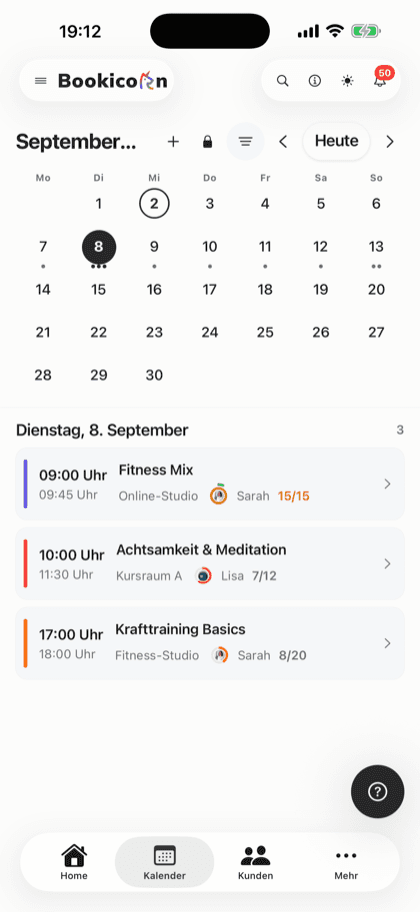
Offering types at a glance
- sessions, appointments, block and rental period
- 4 types
- sessions, series and appointments
- In every plan
- daily, weekly, every 14 days, monthly
- Series
- several durations with their own price
- Duration choice
- commission on your bookings
- 0%
- for you and your clients
- 7 languages
Which offering types can you offer?
You can offer four offering types: fixed sessions as a single session or series, appointments where clients pick their own time, session blocks, and bookings over a rental period. In Bookicorn, fixed sessions and appointments are included in every plan, blocks need the Block courses add-on, and the rental period needs the Resources add-on. You choose the type when you create an offering, and you set payment methods and booking rules the same way for every type.
- Who it's for
- For studios, schools and instructors with group sessions, private lessons or both: yoga, dance, massage, tutoring, coaching, open studios.
- What you get
- Single sessions with their own details per session, series with a repeat pattern, and appointments with a choice of duration, spots per time slot, start times and buffers.
- What it costs
- Fixed sessions, series and appointments are included in every plan, even the Free plan for €0. Session blocks and rental periods are add-ons you turn on.
Group classes in the calendar, private sessions by message?
- Do you still have a private session open on Thursday?
- Can I book 90 minutes instead of 60?
- And how much would that be?
Group classes can be booked online, everything else runs through messages: looking up open times, explaining duration and price, entering it by hand.
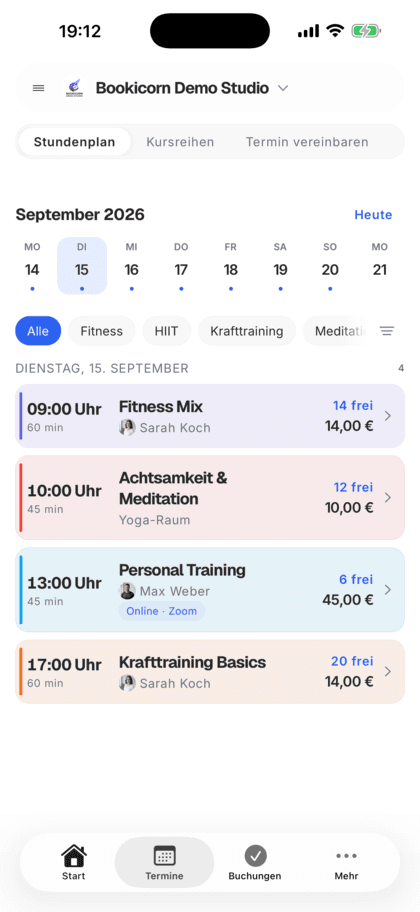
Group classes, series and private sessions are all on the same booking page. With appointments, your clients pick time and duration themselves and see the price right away.
The right offering in three steps
You set the type when you create the offering. After that, the form adapts and only asks what this type needs.
- 1
Choose the type
Fixed sessions, appointments, session block or rental period. You see block and rental period even without the add-on, locked and with the way to the Add-on Store.
- 2
Set the times
Date and time, a repeat pattern, or for appointments an availability profile with your hours per weekday.
- 3
Clients book
Your clients book on your booking page or in the client app. Every booking lands in the calendar, and you get a notification.
What the offering types can do
From a single workshop to a weekly series to a treatment whose time the client picks: every type with its own settings.
All featuresSingle sessions with their own details
Every session can differ from the offering: another time and duration, its own number of spots, a different instructor, a different location or room, and a note.
Recurring series with a pattern
Daily, weekly, every two weeks or monthly, on several weekdays or days of the month. The series ends on a date, after a number of sessions or never.
Appointments
In the availability profile you set when you can be booked. Your clients pick a day and start time and only see times that are really open.
Duration choice with a price per duration
Offer 60, 90 or 120 minutes, for example, each duration with its own price, its own credit value and, if you like, its own label.
Several spots per time slot
One after another or several at once: in an open studio, several clients book the same time until all spots are taken.
Back-to-back start times or a grid with buffers
Time slots follow each other without gaps or start on a grid from 10 to 60 minutes. Buffers before and after keep time free for you.
No double bookings
If the instructor is already booked, the time is blocked. With the Occupancy Management add-on, this also applies to the room. If neither is set, Bookicorn points it out to you.
Session block and rental period
Several sessions as a package with one booking through the Block courses add-on, or bookings from day to day for rentals through the Resources add-on.
Also included
- Extra sessions for appointment offerings, such as outside your hours
- Individual open days and closed periods for vacations and holidays
- Change the time of all upcoming sessions of a series in one step, and clients get an email
- Bookicorn extends series without an end every night
- Preview of all sessions before saving
- Your team also books clients in at a different time
- Booking window, booking cutoff and cancellation deadline per offering
- Instant booking or a request with approval
- Payment methods per offering
- Set to public or private
- Online sessions with a link instead of a location
- Duplicate an offering
- Share a link and QR code for every offering
- Waitlist and guest booking per offering with the matching add-ons
Start for free, no demo call
Create your account and set everything up in a few minutes. The Free plan stays free forever, and for 14 days you can also try every feature.
- Start right away, no demo call
- No credit card needed
- Cancel monthly
 BookicornFree plan
What the offering types look like for you
Four typical setups from different industries. Each is its own offering, and all are on the same booking page.
Yoga studio
Fixed weekly classes as a series. If a session falls on a holiday, you cancel just that one.
- Type
- Fixed sessions, series
- Repeat
- Mon and Wed, 6:30 PM
- Spots
- 14 per session
Massage practice
Treatments in three lengths, each with its own price. After every treatment there's time to get ready.
- Type
- Appointments
- Duration
- 30, 60 or 90 min
- Buffer
- 15 min after
Pottery studio
Open studio on individual days. Several clients throw pots at the same time until the spots are taken.
- Type
- Appointments
- Spots
- 8 per time slot
- Times
- individual open days
Dance school
A beginners' course over eight weeks, booked as a whole. Anyone joining later starts from the next session.
- Type
- Session block
- Sessions
- 8, every Tuesday
- Late entry
- allowed
Which offering type fits your offering?
All four run in one system and can be offered side by side. Here's how they differ:
| Question | Fixed sessionsIncluded in every plan | AppointmentsIncluded in every planThis page | Session blockAdd-onGo to page | Rental periodAdd-onGo to page |
|---|---|---|---|---|
| Who sets the time? | You, with date and time | The client, within your hours | You, for all sessions of the block | The client, from day to day |
| What does the client book? | One session | A time slot | All sessions with one booking | A period with pickup and return |
| Typical for | Group classes, workshops, series | Treatments, private lessons, open studios | Multi-week courses, camps | Rentals and hire |
| Duration | Fixed, changeable per session | Fixed or a choice with a price per duration | Fixed per session | Minimum and maximum in days |
| What you need | Nothing, in every plan | Nothing, in every plan | The Block courses add-on | The Resources add-on |
What others use together with the offering types
Core features are included in every plan, add-ons you turn on when you need them.
Block courses
Sell a fixed series of sessions as a package: one booking, one payment, every session booked. With several blocks per offering and late entry.
Learn moreResources and reservations
Let clients reserve cabins, courts, equipment, animals and rental items online: with units, pricing rules, deposits and a calendar per resource.
Learn moreAvailability profiles
Set once when you can be booked: hours per weekday, individual open days and closed periods for vacations or holidays.
Learn moreCalendar overview
All your studio's sessions as week, month, day or list, with occupancy, instructor and room. Plus filters and the open hours for appointments.
Learn moreBooking rules and cancellation policy
Set the booking window, booking cutoff, cancellation deadline and payment methods for each offering. Bookicorn applies them to every booking.
Learn moreDesigning offerings
Give every offering a description, cover image, gallery, color, categories, difficulty level and notes. With its own address, link and QR code.
Learn moreFrequently asked questions about offering types
Answered briefly. The first sentence is always the answer.
Can't find your question?
Write to usWith fixed sessions you set the date and time, with appointments the client picks the time. For that you only set the hours in the availability profile when you can be booked, and Bookicorn offers the open start times from them.
Still have questions about offering types?
Write to us in two minutes. You get a personal reply from people, not from a bot, and we tell you honestly whether Bookicorn is right for you.

Hi, I'm Daniel. Tell me briefly what you offer, and I'll tell you how to set it up in Bookicorn.
Daniel Haenle · replies personally

Ready to create your first offering?
Create your account in a few minutes and choose the type that fits your offering. The Free plan stays free, and you don't need a credit card.
- 14 days of every feature
- No credit card
- 0% commission
- No minimum term

Ready to go in minutes
- Create your account
- Add your first offering
- 3Share your booking page