




Booking widget: your class schedule right on your website
With the Website Integration add-on, you embed your class schedule, upcoming sessions, prices and team as a widget in your existing website. One code snippet is enough, and the sessions always come up to date from Bookicorn.
- Free plan, free forever
- No demo call, start right away
- No credit card
Updated 25 September 2026
Website integration at a glance
- takes one add-on slot
- Add-on
- blocks for your widget
- Over 20
- as a ready-made starting point
- Templates
- of code for any website
- 1 snippet
- sessions straight from Bookicorn
- Always current
- commission on your bookings
- 0%
How do I embed my booking system in my website?
With the Website Integration add-on, you embed your booking system as a widget in your existing website: in the Manager, you put together blocks like class schedule, upcoming sessions, class packs or team and copy a code snippet into your page. The Bookicorn widget always shows the current sessions and uses the colors of your booking page. Anyone who books lands on your studio page with the chosen session and completes the booking there.
- Who it's for
- For studios, schools and instructors who already have their own website with WordPress, Wix, Squarespace or another builder and want to show their sessions there.
- What you get
- As many widgets as you like from over 20 blocks, ready-made templates, filters, your booking page design or your own colors, allowed domains, preview and view counts.
- What it costs
- Website Integration is an add-on and takes one add-on slot, and on the Free plan you have 1. You add more add-ons on paid plans.
How to get Website Integration
You turn on Website Integration in the Add-on Store of your Manager with one tap and can switch it off at any time. It uses one of your plan's add-on slots. Once all slots are taken, you can add it on in the paid plans.
- Without the active add-on, the embedded widget shows no content
- Set up in the Manager under Settings, for admins only
- Bookings happen on your studio page, and the widget opens it with the chosen session
- Free
- 1 slot
- Starter
- 3 slots
- Professional
- 8 slots
- Premium
- all add-ons
A PDF schedule on your website that's already out of date?
- Your website still shows the old schedule.
- Is the Thursday class still happening?
- Where can I sign up on your site?
Your website shows a class schedule as an image or PDF. Every change means exporting again, uploading again, and clients still message you.
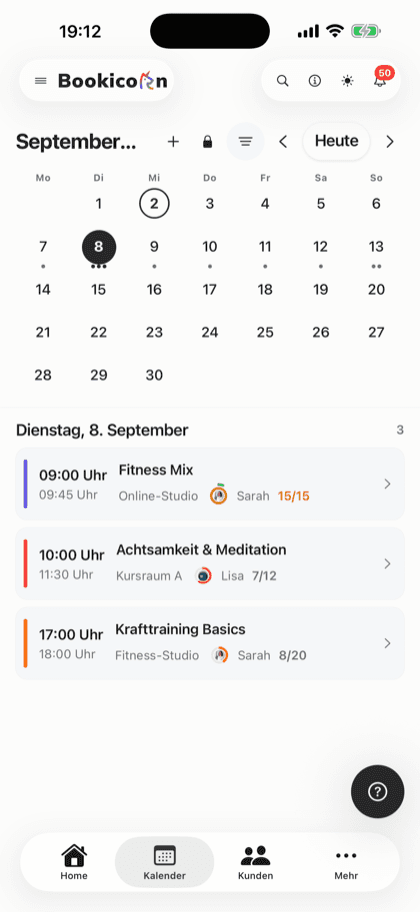
Your website runs a widget with the real sessions from Bookicorn. When you change something in the Manager, it shows on your website right away too.
On your website in three steps
Once it's embedded, you only manage things in the Manager. The widget on your website fetches the sessions itself.
- 1
Create an integration
Give the integration a name, such as Home page or Pricing page. In the editor you pick a template as a starting point or begin with a blank one.
- 2
Pick blocks
Put together class schedule, upcoming sessions, class packs, team or reviews, with filters and colors to match your website.
- 3
Paste the code
Copy the embed code and paste it into your website where the widget should appear. You copy the matching privacy text right along with it.
What the website integration can do
From a slim session widget on the home page to a full pricing page: every integration is its own widget with its own code.
All featuresClass schedule and upcoming sessions
Class schedule as day, week, month or tiles, plus upcoming sessions, offering tiles and appointment offerings.
Prices and gift cards
Your class packs and gift cards with prices. The buy button leads to your studio page, where clients pay.
Team and reviews
Team overview, a single profile, reviews, opening hours, map, FAQ and contact, each as its own block.
Filters per block
Show only certain categories, people, rooms or offerings, such as just the kids' classes on your family page.
Your booking page design
The widget uses the colors of your published booking page. If you like, you set default colors for all widgets or your own colors per integration.
Size and display
You match width, maximum width, padding and corners to your website. You show or hide prices, block offerings and tabs.
Allowed domains
Decide which domains your widget runs on. Other sites that copy your code are rejected.
Views at a glance
See how often your widgets were loaded, per integration and day, over 7, 14, 30 or 90 days.
Also included
- As many integrations as you like, one per page of your website
- Templates like Full booking page, Schedule only, Mini booking and Pricing
- Layout blocks: heading, text block, call to action, tabs, spacing, divider
- Preview before embedding
- Runs isolated, so your website's design stays untouched
- Privacy policy snippet for your privacy policy
- With a custom domain, bookings lead to your domain
- Turn integrations on or off individually
- Your terms and your booking page's language in the widget
Start for free, no demo call
Create your account and set everything up in a few minutes. The Free plan stays free forever, and for 14 days you can also try every feature.
- Start right away, no demo call
- No credit card needed
- Cancel monthly
 BookicornFree plan
How studios use the website integration
Three typical setups. Each is its own integration with its own code.
Yoga studio with WordPress
The home page shows the next five sessions, and the schedule subpage shows the whole weekly schedule with filters.
- Home page
- Upcoming sessions, 5
- Schedule page
- Week with filter
- Design
- like booking page
Swimming school
Every age group has its own page. The widget only shows the matching offerings there.
- Block
- Class tiles
- Filter
- Category Kids
- Domain
- wave-swimschool.com
Fitness studio
The website's pricing page shows class packs and gift cards, with a heading and a call to action above them.
- Template
- Pricing
- Blocks
- Packs, gift cards
- Corners
- matching the website
What goes well with the website integration
Core features are included in every plan, add-ons and pay add-ons you turn on when you need them.
Studio profile page
Your public studio page with sessions, prices, team, reviews and FAQ, bookable right there and with its own sitemap for Google.
Learn moreOffering page
Every offering gets its own page with its own link: description, sessions with open spots, price, instructor, location and gallery, bookable right there.
Learn moreCustom domain
Your booking page at your own address like book.yourstudio.com instead of bookicorn.net, with redirects, https and links in all emails.
Learn moreThemes and branding
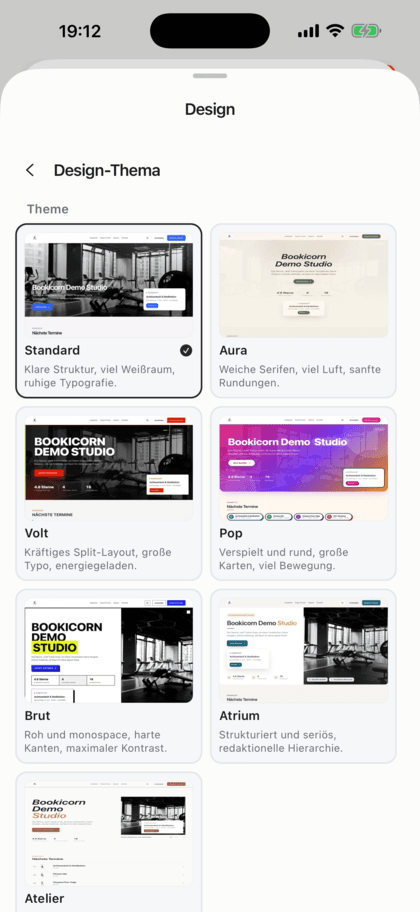
Design templates, your own colors, fonts, logo and favicon: your booking page, website widget and emails in your studio's look.
Learn moreClass schedule views
Show your sessions as a weekly calendar, daily schedule, session list or offering tiles. Clients filter by category, instructor, time of day and location.
Learn moreFrequently asked questions about the website integration
Answered briefly. The first sentence is always the answer.
Can't find your question?
Write to usYes, anywhere you can add your own HTML code. The embed code consists of a script and a placeholder, and you copy both to the spot where the widget should appear.
Still have questions about the website integration?
Write to us in two minutes. You get a personal reply from people, not from a bot, and we tell you honestly whether Bookicorn is right for you.

Hi, I'm Daniel. Tell me briefly what you offer, and I'll tell you how to set it up in Bookicorn.
Daniel Haenle · replies personally

Ready to bring your sessions to your website?
Create your account, set up your offerings and build your first widget with the Website Integration add-on. All add-ons are included in the 14-day trial.
- 14 days of every feature
- No credit card
- 0% commission
- No minimum term

Ready to go in minutes
- Create your account
- Add your first offering
- 3Share your booking page