




Studio website: your page that Google finds
Your studio gets its own page at yourname.bookicorn.net with sessions, prices, team, reviews and FAQ. Clients book right there, and Google gets a sitemap and structured data along with it.
- Free plan, free forever
- No demo call, start right away
- No credit card
Updated 25 September 2026
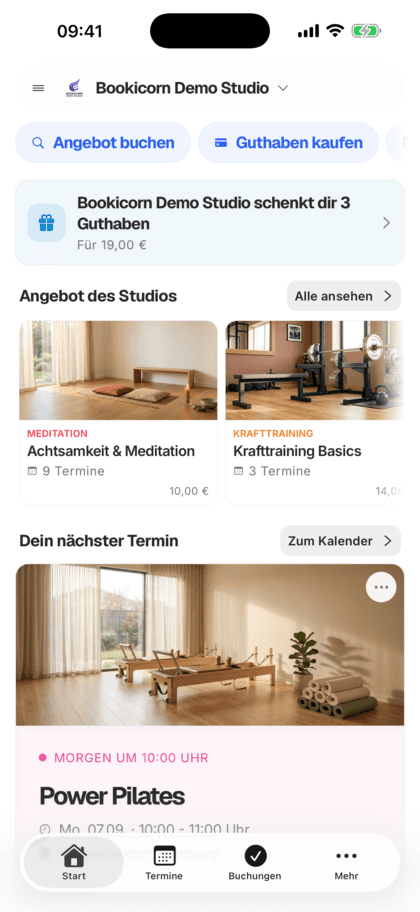
The studio profile page at a glance
- included even in the Free plan
- In every plan
- yourname.bookicorn.net
- Your own address
- automatic for every studio page
- Sitemap
- commission on your bookings
- 0%
- your page's language freely selectable
- 7 languages
- servers, GDPR-compliant
- Frankfurt
What is a studio profile page?
A studio profile page is your studio's public website at Bookicorn, where clients see your offerings and book right away. The page lives at your own address like yourname.bookicorn.net and shows sessions, prices, team, reviews, frequently asked questions, gallery and location. As soon as you switch it live, Google gets its own sitemap and structured data on your studio, sessions and reviews.
- Who it's for
- For studios, schools and instructors who want to be bookable online without their own website, or who need a page next to their website where booking actually happens.
- What you get
- A ready-made page with sessions, class packs, team, reviews, FAQ, gallery, contact and location, plus legal notice and privacy policy as subpages and data for Google.
- What it costs
- The studio profile page is included in every plan, even the Free plan for €0. A custom domain instead of bookicorn.net is available as a pay add-on.
Sessions in a PDF, prices on Instagram, reviews somewhere else?
- Where can I see your current sessions?
- How much is a 10-class pack with you?
- Can I sign up directly somewhere?
Your sessions are in a PDF, your prices in an Instagram post, your reviews on Google. Anyone who wants to book messages you, and you reply to each one individually.
Everything is on one page: current sessions from your calendar, prices, team and reviews. Clients book right there, even in the evening and on weekends.
Online in three steps
The page fills itself from what you create in the Manager anyway. You only add text and images.
- 1
Choose your address
When you sign up, you choose your page's address, such as yoga-loft.bookicorn.net. Bookicorn checks right away whether it's still available.
- 2
Add content
Short intro, about us, directions, up to twelve gallery images, frequently asked questions and amenities. Offerings, sessions, team and class packs are added on their own.
- 3
Go live
Once a location and an offering with a session are created, you switch the page live. From then on it's visible to everyone and open to search engines.
What's on your studio profile page
Sessions, prices and team come straight from the Manager. What you change there appears on your page right away.
All featuresSessions and offerings
Upcoming sessions, weekly calendar, daily schedule or your offerings as a grid and list. Private offerings stay hidden.
Prices and class packs
Your class packs appear with their price on the page and can be bought right there. Every offering shows its price.
Your team
Your team with photo and description. If you like, the page shows first names only.
Reviews
Only approved reviews appear on the page. Google also gets them as star ratings in the structured data.
Frequently asked questions
Your own questions and preset questions, or both together. Search engines read them as FAQ data.
Location and contact
Address with map and directions, plus email, phone, website and social media links.
Built for Google
Its own sitemap with all public offerings, page titles from your studio name, a description from your short intro and structured data on your studio, sessions, team and reviews.
Legal notice and privacy policy
Separate subpages for legal notice, privacy policy and terms, linked in the footer. The legal notice shows your contact details.
Also included
- Link and QR code to share right from the Manager
- Page language freely selectable, one of 7
- Your logo as the share preview image and favicon
- Clients sign in through the page and see their bookings
- Gallery with alt texts for search engines
- Every offering with its own page and link
- Layout freely designed in the builder
- Custom domain instead of bookicorn.net as a pay add-on
Start for free, no demo call
Create your account and set everything up in a few minutes. The Free plan stays free forever, and for 14 days you can also try every feature.
- Start right away, no demo call
- No credit card needed
- Cancel monthly
 BookicornFree plan
What a studio profile page looks like
Four typical setups. You decide in the builder which blocks appear on your page.
Yoga studio
Upcoming sessions at the top, with the team and reviews below. Clients see right away when the next class starts.
- Address
- yoga-loft.bookicorn.net
- Blocks
- Sessions, team, reviews
- Theme
- Aura
Dance school
A weekly calendar with all groups, plus class packs to buy and answers to questions before the first class.
- Blocks
- Weekly calendar, FAQ
- Prices
- 10-class pack · $120
- Theme
- Pop
Pottery studio
The gallery shows finished pieces, with the workshops as a grid below and directions to the studio.
- Blocks
- Gallery, offerings, location
- Gallery
- 12 images
- Theme
- Atelier
Personal training
One person, one clear offer: about us with a photo, reviews and a direct path to contact.
- Blocks
- About us, reviews
- Team
- first name only
- Theme
- Volt
What goes well with your studio profile page
Core features are included in every plan, add-ons and pay add-ons you turn on when you need them.
Booking website builder
Build your booking page from almost 30 blocks in the builder, in rows with up to four columns, with a preview for desktop, tablet and phone.
Learn moreOffering page
Every offering gets its own page with its own link: description, sessions with open spots, price, instructor, location and gallery, bookable right there.
Learn moreVisibility control
You decide when your booking page goes live: set it up in peace and look at it with a test link, then open it to everyone and Google with one switch.
Learn moreThemes and branding
Design templates, your own colors, fonts, logo and favicon: your booking page, website widget and emails in your studio's look.
Learn moreCustom domain
Your booking page at your own address like book.yourstudio.com instead of bookicorn.net, with redirects, https and links in all emails.
Learn moreReviews
Your clients review your studio with stars and text. You approve every review before it appears on your booking page.
Learn moreFrequently asked questions about the studio profile page
Answered briefly. The first sentence is always the answer.
Can't find your question?
Write to usNo. Your studio profile page at yourname.bookicorn.net is a complete page where clients book directly. If you already have a website, you link to your page from there or embed booking with the Website Integration add-on.
Still have questions about the studio profile page?
Write to us in two minutes. You get a personal reply from people, not from a bot, and we tell you honestly whether Bookicorn is right for you.

Hi, I'm Daniel. Tell me briefly what you offer, and I'll tell you how to set it up in Bookicorn.
Daniel Haenle · replies personally

Ready for your own studio page?
Choose your address, create a location and an offering and switch your page live. The Free plan stays free, and you don't need a credit card.
- 14 days of every feature
- No credit card
- 0% commission
- No minimum term

Ready to go in minutes
- Create your account
- Add your first offering
- 3Share your booking page