




Subsidized classes: give credits to sponsored clients
Create internal class packs that only you hand out, and show on your booking page which funding programs exist. Sponsored clients book with their credits like everyone else.
- Free plan, free forever
- No demo call, start right away
- No credit card
Updated 25 September 2026
Subsidized offerings at a glance
- not public, handed out only by you
- Internal packs
- sponsored clients book with credits
- No co-payment
- per offering, only for your accounting
- Billing note
- Funded offerings on your page
- Block
- offerings with notes, clients with credits
- Key figures
- included in the 14-day trial
- Add-on
What are subsidized classes in Bookicorn?
Subsidized classes are offerings whose costs are fully or partly covered by a third party, such as a health insurer, an employer or a funding program. With Bookicorn's Subsidized Courses add-on, you create internal class packs for this that nobody can buy publicly and that only you assign to clients. On top of that there's a billing note per offering for your accounting and a block that explains the funding programs on your booking page.
- Who it's for
- For studios and schools with prevention courses, corporate partnerships or funding programs where the participant doesn't pay, or doesn't pay alone.
- What you get
- Internal class packs, a billing note per offering, the Funded offerings block for your booking page and an overview with key figures.
- What it costs
- The add-on takes one add-on slot in your plan. During the 14-day trial it's included for free.
How to get Subsidized offerings
You turn on Subsidized offerings in the Add-on Store of your Manager with one tap and can switch it off at any time. It uses one of your plan's add-on slots. Once all slots are taken, you can add it on in the paid plans.
- In the Add-on Store, the add-on is called Subsidized Courses
- Only you see internal packs, and your clients get them assigned by you
- Without the add-on, toggles and fields in the Manager stay visible but locked
- Free
- 1 slot
- Starter
- 3 slots
- Professional
- 8 slots
- Premium
- all add-ons
Sponsored clients handled through lists and workarounds?
- My company pays for the training, how do I book?
- I'm signed up through the funding program, do I still have to pay?
- Which offerings does my health insurance actually subsidize?
Sponsored clients sit on a separate list, get special prices on request and still ask every time how they should book. At the end of the month you piece together who came through which program.
Sponsored clients get an internal class pack and book with it like everyone else. Your booking page shows which programs exist, and the offering carries the note for billing.
How sponsored clients get to their session
You create the pack once and give it to everyone who comes through the program.
- 1
Create an internal pack
Create a class pack, such as ten units for a corporate program, and set it to internal. It appears neither on your booking page nor in the client portal.
- 2
Assign credits
In the client profile you add the pack to your sponsored client, with start, expiry and an internal note, such as the program. Your client gets an email about it.
- 3
The sponsored client books
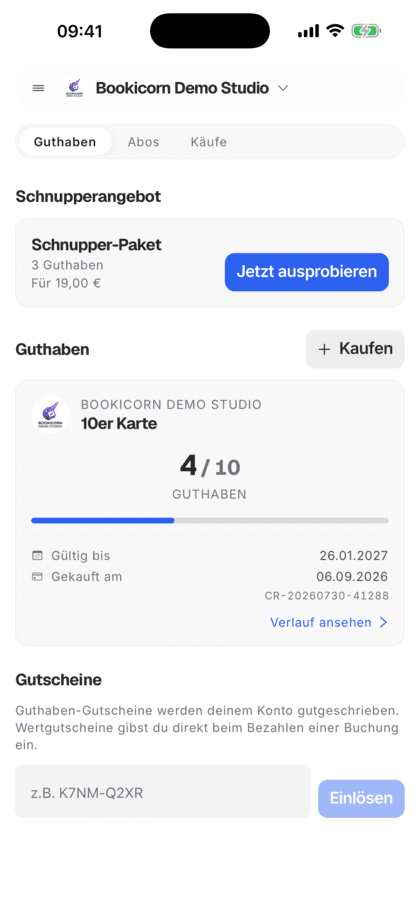
Your client books on your booking page or in the client app with their credits, provided the offering accepts credits as a payment method.
What the add-on can do
Three building blocks for offerings that someone else pays for or subsidizes.
All featuresInternal class packs
Packs with the internal toggle don't appear on your booking page, in the client portal, in the client app or in the Website Integration. Only admins hand them out.
Assign credits directly
In the client profile you add credits using the internal pack as a template, choose start and expiry and note in an internal note where they come from.
Billing note per offering
In each offering's billing section, you note how it's billed, such as through a health insurer. The note only appears in the Manager, and your clients don't see it.
Funded offerings block
On your booking page you explain the funding and list programs with their share, such as a health insurer covering up to 80 percent.
Key figures in the add-on
The add-on overview shows how many offerings carry a billing note and how many clients still have credits, with a jump to offerings and clients.
Validity by program
You set the credits' start and expiry when assigning them, such as until the end of the funding year or a fixed number of weeks.
Also included
- The pack template takes over name, credits and price
- Type of credit selectable, such as Manual credit or Gift
- Sponsored clients book on the booking page and in the client app like everyone else
- Set closed corporate offerings to private, in every plan
- Offerings without a price with the Free payment method
- Self-paying clients get their invoice with the Invoicing System add-on
Start for free, no demo call
Create your account and set everything up in a few minutes. The Free plan stays free forever, and for 14 days you can also try every feature.
- Start right away, no demo call
- No credit card needed
- Cancel monthly
 BookicornFree plan
How studios use subsidized offerings
Three typical setups for different payers.
Pilates studio with a back class
Participants pay themselves and get a subsidy from their health insurer. The booking page explains which insurers contribute.
- Block
- Funded offerings
- Program
- Health insurer, up to 80%
- Invoice
- with the Invoicing System add-on
Fitness studio with a corporate partner
An employer covers ten units per employee. Everyone gets the internal pack added and books with it themselves.
- Pack
- internal, 10 units
- Assigned
- in the client profile
- Note
- Corporate program 2026
Education provider
A funding program covers the cost of a series. The credits run until the end of the funding period, and the note on the offering records the funding reference.
- Expiry
- Fixed expiry date
- Billing note
- Funding reference
- Payment method
- Credits
What goes well with subsidized offerings
Core features are included in every plan, add-ons you turn on when you need them.
Class packs
Sell 10-class packs and other class packs online. Bookicorn deducts credits with every booking and shows your clients their balance.
Learn moreInvoicing system
Automatic invoices and cancellation invoices for bookings, credit and gift card purchases, with ZUGFeRD PDF and a copy to your accounting.
Learn moreClient management
A client list with search and filters, client records with bookings, credits, notes and invoices, plus CSV export and GDPR-compliant removal.
Learn moreBooking website builder
Build your booking page from almost 30 blocks in the builder, in rows with up to four columns, with a preview for desktop, tablet and phone.
Learn moreAttendance tracking
A participant list for every session, as a PDF to check off at the door or as a CSV for spreadsheets. Check off digitally with the Digital Attendance add-on.
Learn moreVisibility control
You decide when your booking page goes live: set it up in peace and look at it with a test link, then open it to everyone and Google with one switch.
Learn moreFrequently asked questions about subsidized offerings
Answered briefly. The first sentence is always the answer.
Can't find your question?
Write to usPacks that nobody can buy publicly. These packs appear neither on your booking page nor in the client portal or client app, and only admins assign them. That way sponsored clients get their credits without others being able to buy them.
Still have questions about subsidized offerings?
Write to us in two minutes. You get a personal reply from people, not from a bot, and we tell you honestly whether Bookicorn is right for you.

Hi, I'm Daniel. Tell me briefly what you offer, and I'll tell you how to set it up in Bookicorn.
Daniel Haenle · replies personally

Give your sponsored clients their credits
Turn on the Subsidized Courses add-on in the Add-on Store, create your first internal pack and add it to your sponsored clients. It's included in the 14-day trial.
- 14 days of every feature
- No credit card
- 0% commission
- No minimum term

Ready to go in minutes
- Create your account
- Add your first offering
- 3Share your booking page