




Client documentation: notes and files right on the client
Write a note after every session right from the participant list and store signed forms, consents and contracts in the client record. Only your team sees both.
- Free plan, free forever
- No demo call, start right away
- No credit card
Updated 25 September 2026
Documentation at a glance
- takes one add-on slot, even on the Free plan
- Add-on
- session note from the participant list
- From the session
- per file in storage
- 20 MB
- clients see neither notes nor files
- Only your team
- servers, private storage
- Frankfurt
- storage per team member, admins only
- For the team too
What is client documentation in Bookicorn?
Client documentation in Bookicorn means you record what happened in every session and keep your clients' paperwork in one place. With the Documentation add-on, you write the note right from the session's participant list, and it then appears with its date in the client record's history. On top of that there's storage for intake forms, questionnaires, consents and contracts that only your team sees.
- Who it's for
- For anyone who tracks progress and keeps paperwork: personal training, physical therapy and massage practices, coaching, riding schools, dance and music lessons.
- What you get
- Session notes from the session, a history in the client record, storage for files up to 20 MB on the client and separate storage for every team member.
- What it costs
- Documentation is an add-on and takes one add-on slot in your plan, which already works on the Free plan. During the 14-day trial you can try it like all add-ons.
How to get Documentation
You turn on Documentation in the Add-on Store of your Manager with one tap and can switch it off at any time. It uses one of your plan's add-on slots. Once all slots are taken, you can add it on in the paid plans.
- Session note in every session's participant list, with date and file
- Storage on the client and on the team member, each file up to 20 MB
- You have notes in the client record even without the add-on
- Without the add-on, the entry in the session leads to the add-on page
- Free
- 1 slot
- Starter
- 3 slots
- Professional
- 8 slots
- Premium
- all add-ons
Notes in a notebook, consents in a binder?
- What did we do with my shoulder last time?
- Did you get my consent form yet?
- Can you dig out my contract again?
What happened in the last session is in a notebook your colleague has. Signed forms are in a binder at the office, consents in an inbox, and nobody can find them when it matters.
After the session you tap Session note in the participant list. History and paperwork are in the client record, for everyone on the team who's allowed to see them.
From the session to the client record
You document where the session happens and find everything later on the client.
- 1
Session note
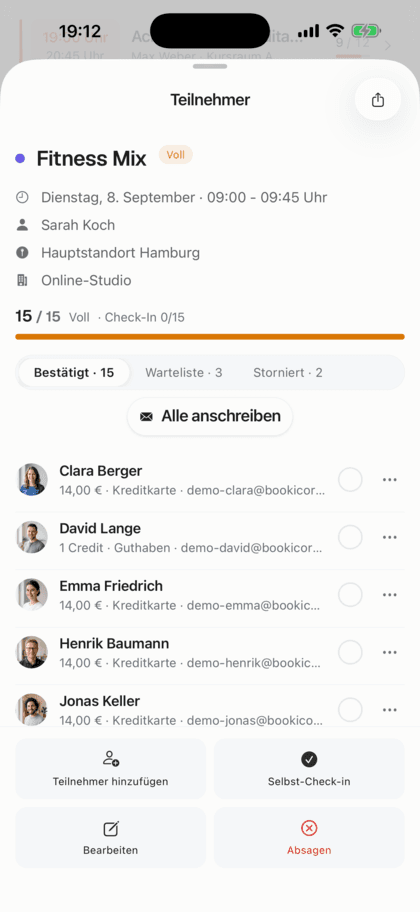
In the session's participant list, tap Session note next to the person. The date is prefilled and editable, and you attach a file right there.
- 2
History in the record
The note appears in the client record's history, with the date and who wrote it. You pin important ones to the top.
- 3
Store paperwork
You upload the intake form, consent or contract in the client record. It opens through a link that's valid for one hour.
What Documentation can do
Notes on every session and storage for everything you need in writing, in one place.
All featuresNote right from the session
In every session's participant list, you write a note for each person. It's attached to the booking and then appears in the client record's history.
Date of your choice
The date is prefilled with the session. You can also add notes later and change a note's date afterwards.
Storage for paperwork
Signed intake forms, questionnaires, consents and contracts live in the client record, each file up to 20 MB, with date and size.
Only for your team
Clients see neither notes nor files. Instructors only see notes if you give them the Notes data permission. The files are kept in private storage.
Separate per person
If a client also books for children or a partner, you assign notes and files to the respective person and filter by it.
Storage for your team
There are also notes and storage for every team member, such as for contracts and certificates. Only your studio's admins see them.
Also included
- Pinned notes stay at the top
- Every note shows who wrote it
- Only the author can delete a note
- Any file type, such as PDF or photo
- When a client is removed, notes and files are deleted
Start for free, no demo call
Create your account and set everything up in a few minutes. The Free plan stays free forever, and for 14 days you can also try every feature.
- Start right away, no demo call
- No credit card needed
- Cancel monthly
 BookicornFree plan
How others document
Three typical uses from different industries.
Personal training
After every session, a short note on exercises and weights. The health questionnaire is stored as a PDF in the record.
- Note
- after every session
- Storage
- Health questionnaire
Massage practice
History per treatment, added in the evening with the correct date. The signed consent is in storage.
- Date
- added later
- Storage
- Consent
Riding school
Parents book for two kids. Notes on riding progress and the liability waiver are kept separately per child.
- People
- 2 kids
- Storage
- Liability waiver per child
Notes without the add-on or with Documentation?
You have notes in the client record on every plan. The add-on adds the session and storage.
| Question | Client managementIncluded in every planGo to page | DocumentationAdd-onThis page |
|---|---|---|
| Notes in the client record | Yes, with date, author and pinning | Yes, with date, author and pinning |
| Note right from the session | No | Yes, from the participant list |
| Files on the client | No | Yes, up to 20 MB per file |
| Notes on the team | Yes, admins only | Yes, admins only |
| Files on the team | No | Yes, admins only |
What others use together with Documentation
Core features are included in every plan, add-ons you turn on when you need them.
Client management
A client list with search and filters, client records with bookings, credits, notes and invoices, plus CSV export and GDPR-compliant removal.
Learn moreAttendance tracking
A participant list for every session, as a PDF to check off at the door or as a CSV for spreadsheets. Check off digitally with the Digital Attendance add-on.
Learn moreStaff management
All your instructors with profile, qualifications and sessions in one place. Assign them to offerings, plan substitutes and keep internal notes.
Learn moreGDPR and data protection
Servers in Frankfurt, a data processing agreement at sign-up, account deletion by clients and legal pages on your booking page. In every plan.
Learn moreCustom Terms
Add your own terms and conditions in the Manager. Your clients accept them when booking, buying credits and subscribing, instead of Bookicorn's terms.
Learn moreFrequently asked questions about client documentation
Answered briefly. The first sentence is always the answer.
Can't find your question?
Write to usOnly your team, and your clients don't see them. Instructors only see notes and files on the client with the Notes data permission, and only your studio's admins see notes and files on team members.
Still have questions about client documentation?
Write to us in two minutes. You get a personal reply from people, not from a bot, and we tell you honestly whether Bookicorn is right for you.

Hi, I'm Daniel. Tell me briefly what you offer, and I'll tell you how to set it up in Bookicorn.
Daniel Haenle · replies personally

Ready to record every session properly?
Create your account, add the Documentation add-on and write your first note right from the participant list after your next session. The Free plan stays free.
- 14 days of every feature
- No credit card
- 0% commission
- No minimum term

Ready to go in minutes
- Create your account
- Add your first offering
- 3Share your booking page