




Dark mode in your booking system: light or dark, whatever suits
The Manager, client app and booking page come in light and dark. All three follow the device's setting, and anyone who wants to can switch with one tap.
- Free plan, free forever
- No demo call, start right away
- No credit card
Updated 25 September 2026
Dark mode at a glance
- appearance in the Manager
- System, light, dark
- follows the device's setting
- Automatic
- with a light and a dark variant
- Every theme
- for visitors to your booking page
- Switch
- separately for light and dark
- Your own colors
- even the Free plan
- In every plan
What is dark mode in a booking system?
Dark mode is the dark display of an interface, with light text on a dark background, which many people prefer on their phone or in the evening. At Bookicorn, the Manager, client app and booking page come in light and dark, and all three automatically follow the device's setting. In the Manager you can also fix light or dark, and you can offer your visitors their own switch if you like.
- Who it's for
- For you and your team when you work in the Manager in the evening, and for clients whose phone is set to dark.
- What you get
- System, light or dark in the Manager, a toggle in the client app, a dark variant of every theme and a switch for visitors to your booking page.
- What it costs
- Dark mode is included in every plan, even the Free plan for €0. Your own colors for the light and dark variant are part of branding from Starter.
Glaring white at 10 PM?
- Can your page be set to dark? It's glaring in the evening.
- My phone is set to dark, but your booking page glows white.
The phone is set to dark, but the booking page still glows white. And anyone checking the participant list in the evening stares at a bright screen.
The booking page, client app and Manager follow the device's setting. Anyone who wants something different switches with one tap.
How dark mode works for you
You don't have to set anything up for it to work. If you like, you shape the dark variant too.
- 1
Choose a theme
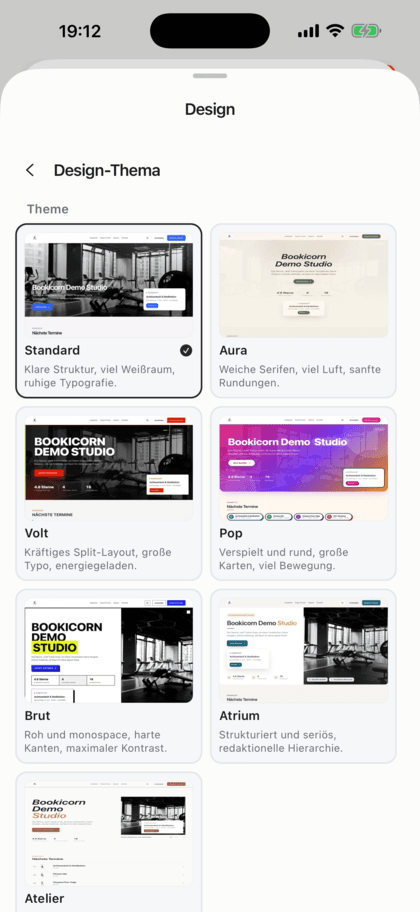
In your booking page design you choose a theme. Each has a light and a dark variant, and the preview in the builder shows you both.
- 2
Offer a switch
If you like, your booking page shows a switch in the header, and in the menu on phones. Visitors switch themselves, and the choice is remembered.
- 3
Everyone chooses for themselves
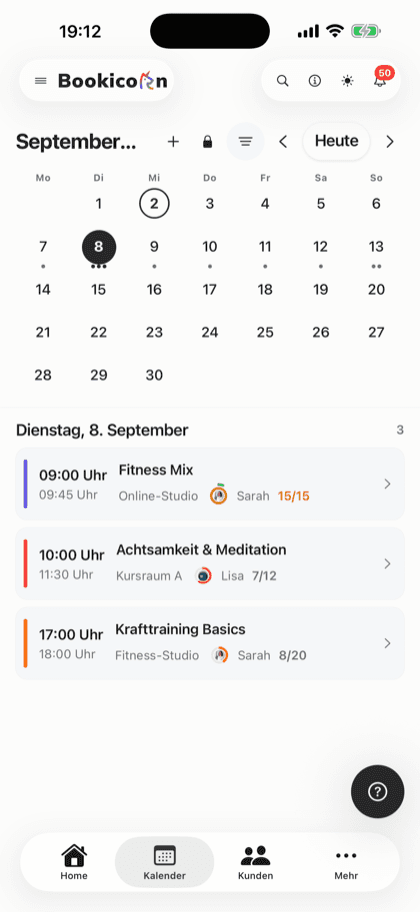
In the Manager you set system, light or dark, and your clients switch to dark design in the client app. The choice applies per device.
What dark mode can do at Bookicorn
From the Manager to the email to your clients: light and dark everywhere, no add-on needed.
All featuresAppearance in the Manager
Under Settings, General you choose system, light or dark. System follows your device's setting, even when it switches automatically in the evening.
Switch with one tap
In the Manager's header you switch between light and dark, in the browser as well as in the app.
Client app follows the device
The client app and client portal in the browser start in the device's setting. Under Settings, your clients switch to dark design.
Every theme in light and dark
All themes of your booking page have a light and a dark variant. Visitors see the variant that matches their device.
Your own colors per mode
With your own branding, you set primary color, buttons, accent, background, text and footer separately for light and dark. Logo, colors and fonts are available from Starter.
Switch for visitors
Turn on a light-dark switch on your booking page. It sits in the header, and in the menu on phones, and remembers the choice in the browser.
Emails in your page's design
Emails to your clients use the colors of your booking page, in the dark variant if you like.
Preview in both modes
In the builder, you switch the preview between light and dark on a large screen and see how your page looks in both variants.
Also included
- Keyboard, dropdowns and date wheels adapt on phones
- The browser bar matches the Manager's color
- Choice saved per device
- Client app in your colors in both modes, from Starter
- Seven themes, all with a dark variant
Start for free, no demo call
Create your account and set everything up in a few minutes. The Free plan stays free forever, and for 14 days you can also try every feature.
- Start right away, no demo call
- No credit card needed
- Cancel monthly
 BookicornFree plan
What goes well with dark mode
Core features are included in every plan, add-ons you turn on when you need them.
Themes and branding
Design templates, your own colors, fonts, logo and favicon: your booking page, website widget and emails in your studio's look.
Learn moreBooking website builder
Build your booking page from almost 30 blocks in the builder, in rows with up to four columns, with a preview for desktop, tablet and phone.
Learn moreOn every device
Booking page, client portal and Manager adapt to every screen. The Manager and client app are also available for Android.
Learn moreClient portal
Your studio's client portal: book and cancel sessions, buy credits, manage subscriptions, download invoices. In the browser and in the client app.
Learn moreSeven languages
Booking page, client app, Manager and emails in 7 languages: German, English, Spanish, French, Italian, Dutch and Polish.
Learn moreFrequently asked questions about dark mode
Answered briefly. The first sentence is always the answer.
Can't find your question?
Write to usYes, in the Manager, in the client app and on your booking page. All three follow the device's setting, and in the Manager and the client app you can also switch yourself.
Still have questions about dark mode?
Write to us in two minutes. You get a personal reply from people, not from a bot, and we tell you honestly whether Bookicorn is right for you.

Hi, I'm Daniel. Tell me briefly what you offer, and I'll tell you how to set it up in Bookicorn.
Daniel Haenle · replies personally

Ready for a booking system that does light and dark?
Create your account, choose a theme and look at your booking page in both modes. The Free plan stays free, and you don't need a credit card.
- 14 days of every feature
- No credit card
- 0% commission
- No minimum term

Ready to go in minutes
- Create your account
- Add your first offering
- 3Share your booking page